总结稿
转写可靠性说明
00:00–01:09 的捕获转写不可可靠恢复,以下内容不推测或补写该时段;摘要依据 01:11 之后的可用转写、关键画面与外部核验结果。
视频内容
视频介绍 Matt Pocock 的 Wayfinder:当任务大到无法在单次 Agent 会话的有效上下文中完成时,不再预先硬拆一条固定 TODO,而是创建一张可持续更新的“寻路地图”。地图从模糊起点与目标出发,将尚未解决的问题记作决策工单;研究、原型、讨论和现实任务逐步消除未知,完成一项后再重新计算当前可推进的 frontier。
Wayfinder 的核心工作方式包括:
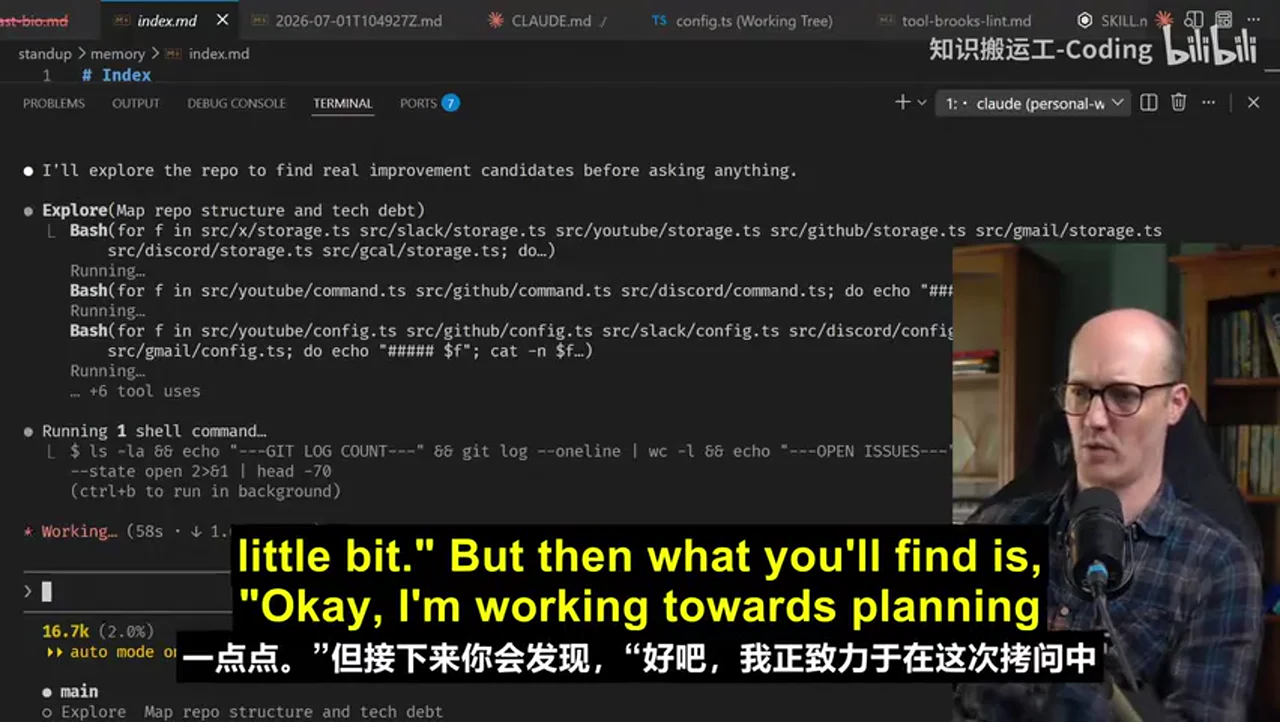
- 首先探索代码库,并通过提问明确“完成是什么样子”及最终交付物。
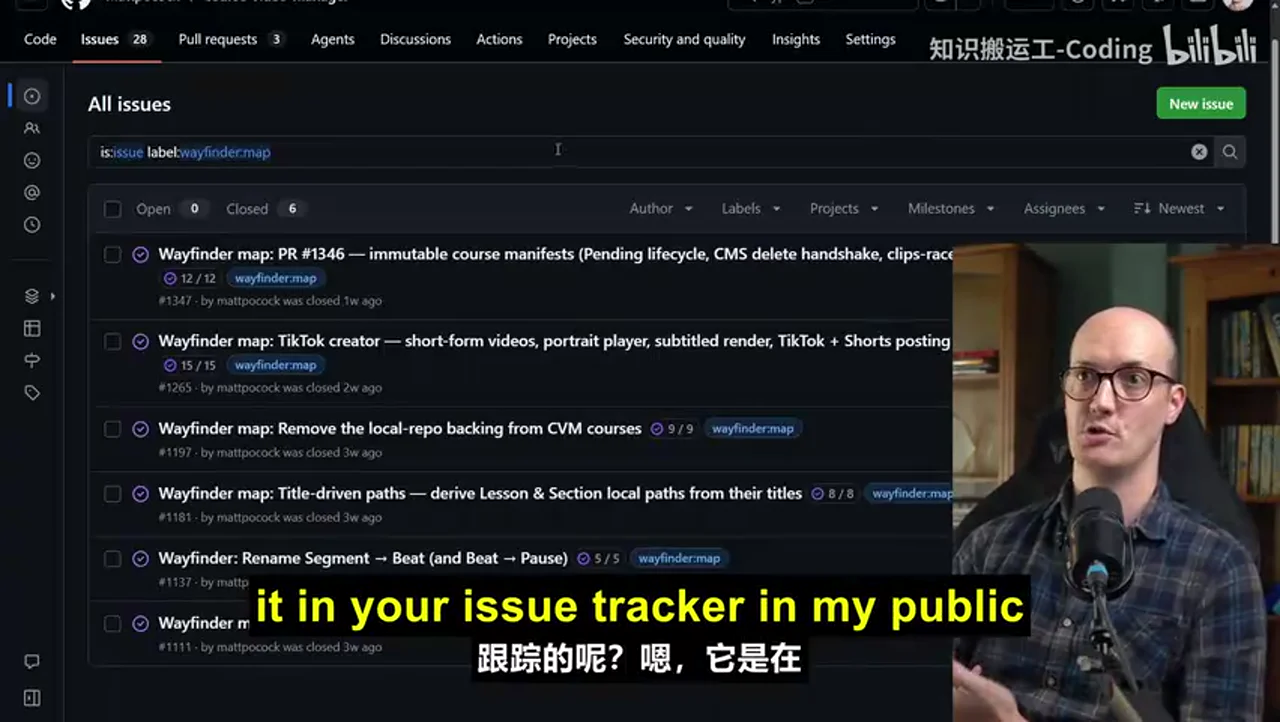
- 在 Issue Tracker 中建立父级地图和子级决策工单,记录结论、原型、阻塞关系与后续路径。
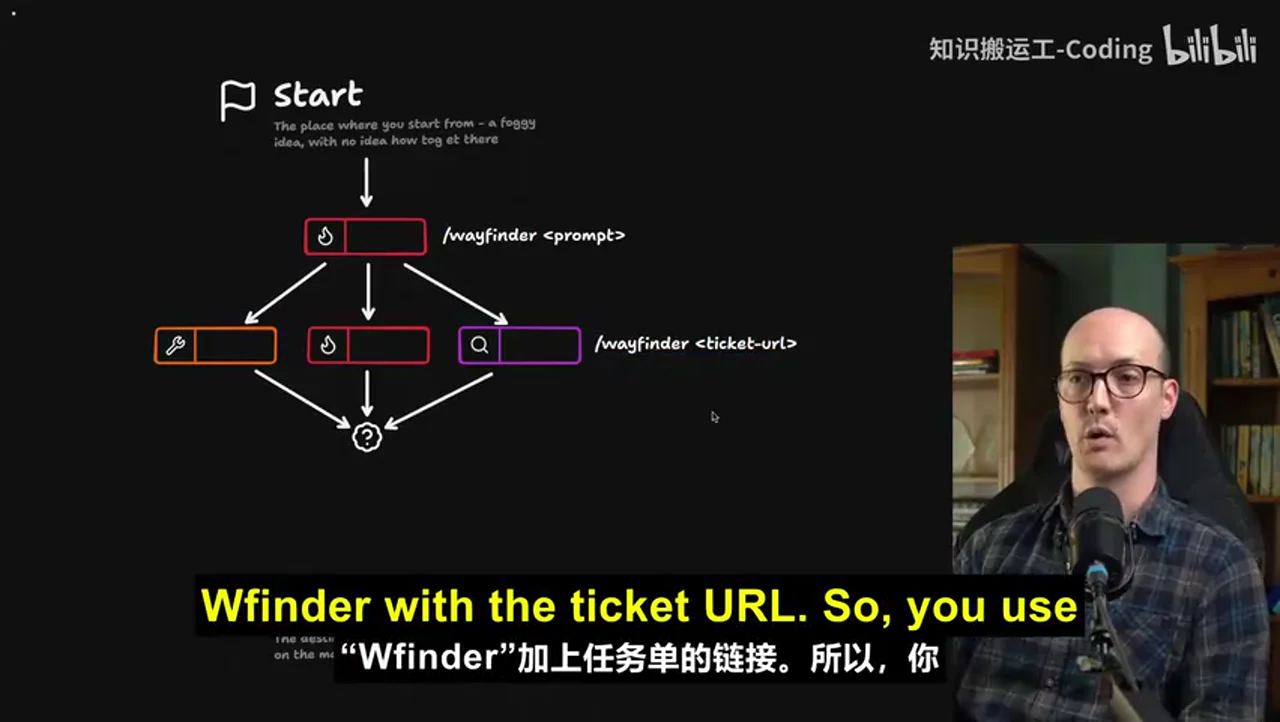
- 对每个可执行工单开启独立 Agent 会话;既可以用描述创建初始地图,也可以把具体 ticket URL 交回 Wayfinder 继续寻路。
- 工单分为 research、prototype、grilling、task 四类。原型提供高保真反馈,避免大量前置规划退化为僵硬的瀑布流程。
- 地图达到目标后,可依次转换为 spec、implementation tickets,再实现和代码审查。spec 在作者的方法中只是跨会话工作的“目的地文件”,代码承载结果后不必永久维护。
视频强调适用边界:能在一次会话内规划并完成、路径已经清楚的任务不需要 Wayfinder;它主要服务于存在大量“战争迷雾”、必须边调查边决策的跨会话大任务。
外部核验补充
官方文档确认:Wayfinder 可在 Issue Tracker 中用带 wayfinder:map 标签的父 issue 和子工单保存地图、决策及阻塞关系;未配置 tracker 时可回退到本地 Markdown。文档列出的路径包括 GitHub、GitLab、Linear、Jira 和本地 Markdown,但各 tracker 的原生阻塞能力不同。Matt Pocock Skills:Wayfinder
官方 SKILL.md 也确认四种 ticket type 为 research、prototype、grilling、task,并对 HITL 与 AFK 模式作区分。Wayfinder SKILL.md
AI 辅助提炼
Wayfinder 管理的不是一份静态计划,而是“当前有哪些未知、哪些决策已具备前提、哪些证据支持既有结论”。它用持久化工单把任务状态移出聊天上下文,让多个短会话围绕同一决策图协作。其代价是额外流程,因此只有任务的不确定性与跨会话成本足够高时才划算。
辅助理解
转写可靠性说明
00:00–01:09 的 ASR 内容不可靠,无法从捕获转写中恢复准确措辞。以下理解不会为该时段虚构内容,仅使用 01:11 之后的可用转写、实际关键画面和已链接的核验资料。
视频内容:Wayfinder 解决什么问题
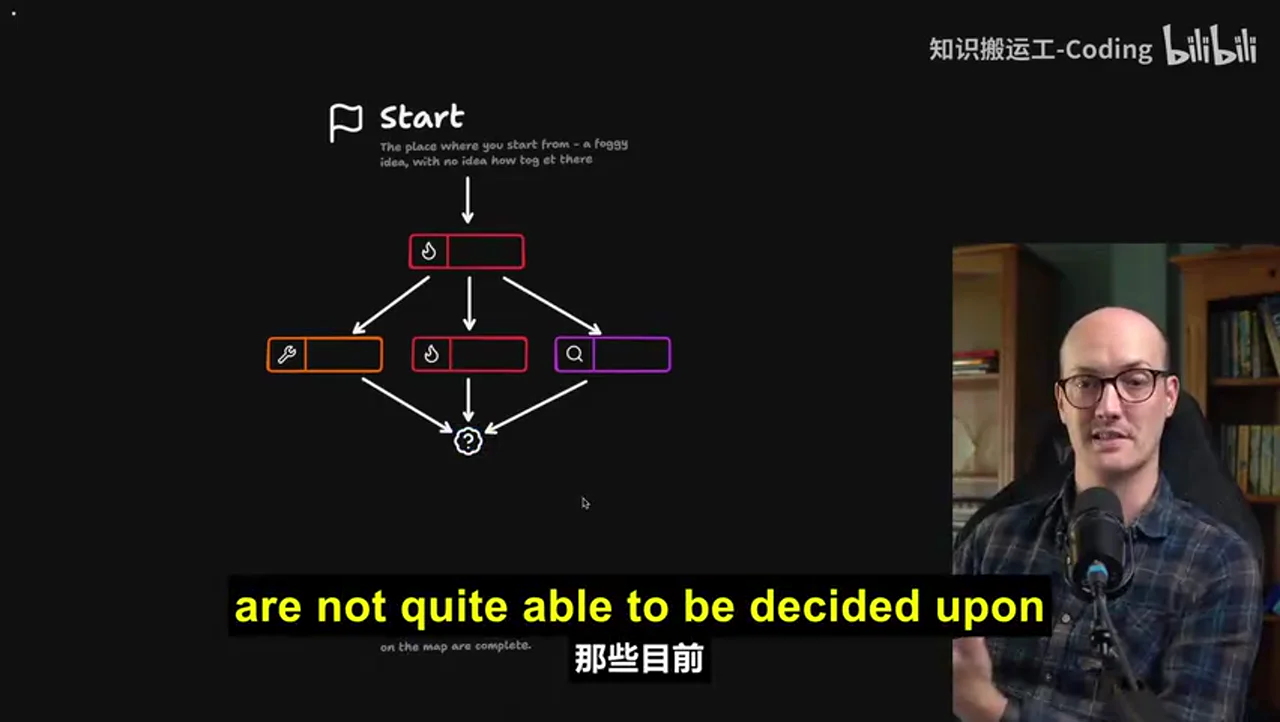
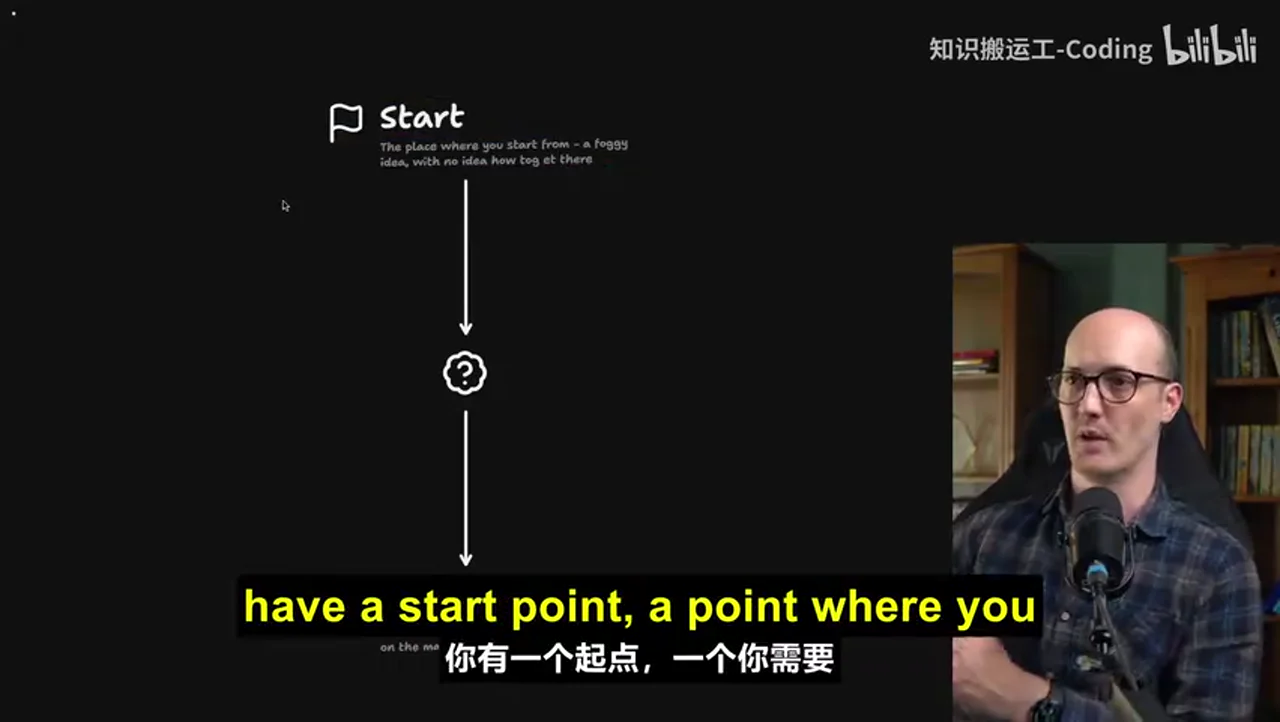
普通拆任务方式往往默认“路径已经知道”,只需把大任务切成小块;视频指出,真正困难的大任务常常连正确路径都未知。此时过早固定 TODO,会把猜测伪装成计划。Wayfinder 改为维护一张共享地图:已解决的决策形成路径,未满足前提的事项留在 fog,可立即推进的事项构成 frontier。
flowchart TD
    A["模糊目标"] --> B["探索仓库与提问"]
    B --> C["创建 Wayfinder 地图"]
    C --> D{"当前 frontier"}
    D --> E["Research"]
    D --> F["Prototype"]
    D --> G["Grilling"]
    D --> H["Task"]
    E --> I["结论写回决策工单"]
    F --> I
    G --> I
    H --> I
    I --> J{"迷雾是否消除"}
    J -- "否" --> D
    J -- "是" --> K["到达目标产物"]
这不是一次性生成完整路线,而是一个反馈循环:每个结果都可能解除阻塞、暴露新问题或改变后续优先级。关键画面中的分支与汇合比线性清单更能表达这种机制。
视频内容:地图、Spec 与 Tickets 各自承担什么
- Wayfinder map:跨会话保存当前目标、决策、证据、阻塞与 frontier。
- 决策工单:承载研究、原型、讨论或现实任务的结果,是地图的可追溯依据。
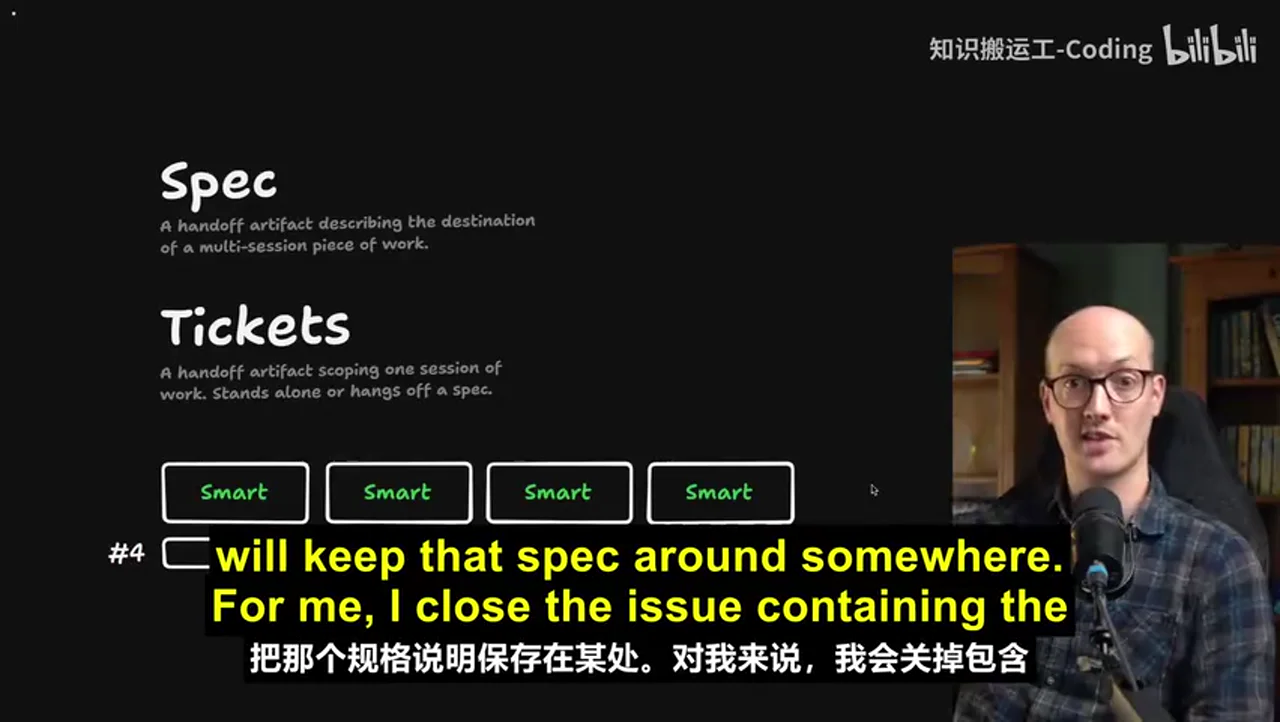
- Spec:在作者的方法中是多会话工作的目的地与交接产物,不被视为永久文档。
- Implementation tickets:把已明确的 spec 切成适合单次实现会话的工作单元。
视频给出的总体链条是 wayfinder → to-spec → to-tickets → implement → code review。Wayfinder 位于规格形成之前,负责把未知问题逐步变成有依据的决定。
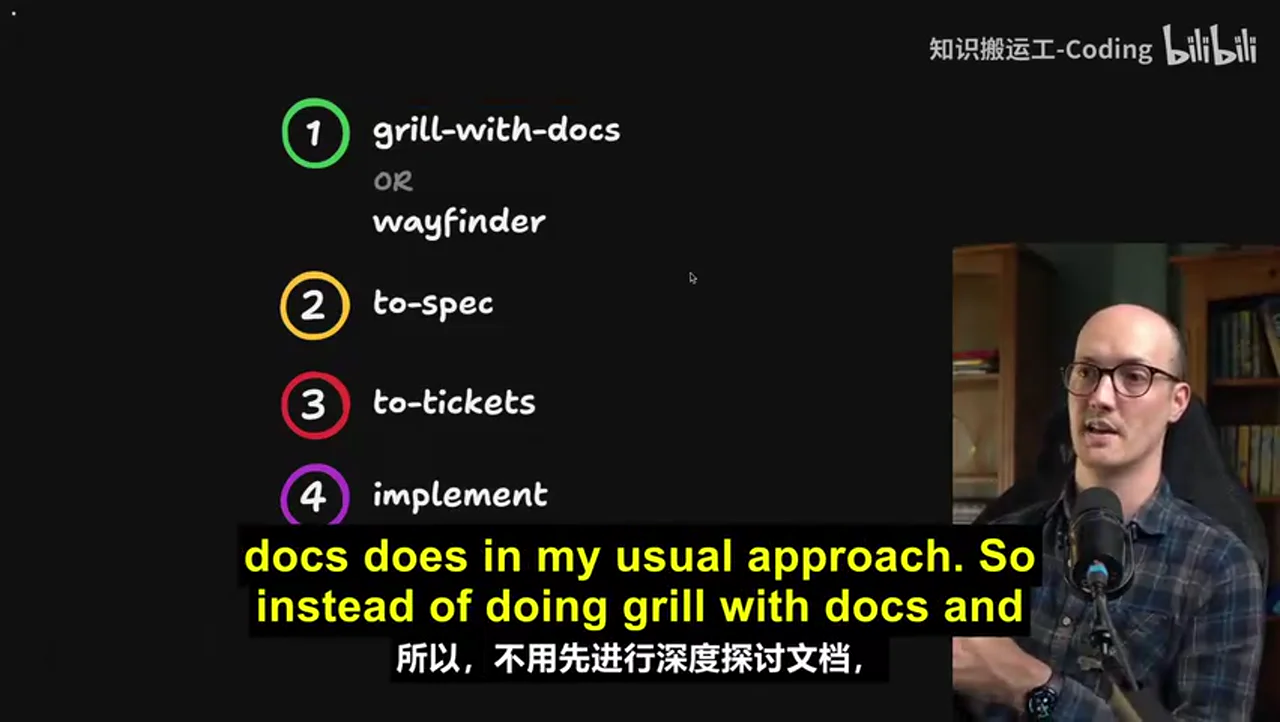
Spec 与 ticket 的区别不只是篇幅:前者维持跨会话目标一致性,后者限制单次会话范围。两者结合,减少每次新会话重新解释全部背景的负担。
外部核验补充
- 官方文档确认,典型地图是 Issue Tracker 中带
wayfinder:map标签的父 issue,子工单保存具体决策和阻塞;未配置 tracker 时可使用本地 Markdown。Matt Pocock Skills:Wayfinder - 官方文档明确列出 GitHub、GitLab、Linear、Jira 和本地 Markdown 等路径,但不同 tracker 的阻塞关系能力并不相同,因此视频中“任意 tracker”应理解为需要适配配置,而不是所有平台能力完全等价。Matt Pocock Skills:Wayfinder
- 四种工单类型 research、prototype、grilling、task 得到官方 Skill 文件确认。Wayfinder SKILL.md
AI 辅助理解:它本质上是外部化的决策状态机
Wayfinder 可以被理解为把 Agent 的工作记忆外部化到一个可审计系统中:聊天只负责当前一步,Issue Tracker 负责长期状态。每个 ticket 不只是待办事项,更是一次“为了减少某个未知而采取的行动”;关闭 ticket 的价值在于产生了可写回地图的证据或决定。
由此可得到三个实践判断:
- 以不确定性而非规模决定是否使用:任务很大但路径明确,可以直接拆实现票;任务规模中等但依赖多项未知,反而适合建图。
- 原型是规划工具,不只是实现预演:原型的反馈会改变地图,因此能纠正低保真的文字规划。
- 保留来源链比保留长摘要更重要:spec 会压缩信息,决策工单保留原始讨论与证据;Agent 困惑时应沿链接回看来源。
以上三点是基于视频机制的 AI 辅助推断,不是讲者逐字结论。
Data
增强转写稿
[00:00] [ASR unreliable; wording not recoverable from the captured transcript] [00:05] [ASR unreliable; wording not recoverable from the captured transcript] [00:08] [ASR unreliable; wording not recoverable from the captured transcript] [00:11] [ASR unreliable; wording not recoverable from the captured transcript] [00:13] [ASR unreliable; wording not recoverable from the captured transcript] [00:16] [ASR unreliable; wording not recoverable from the captured transcript] [00:17] [ASR unreliable; wording not recoverable from the captured transcript] [00:21] [ASR unreliable; wording not recoverable from the captured transcript] [00:22] [ASR unreliable; wording not recoverable from the captured transcript] [00:24] [ASR unreliable; wording not recoverable from the captured transcript] [00:27] [ASR unreliable; wording not recoverable from the captured transcript] [00:31] [ASR unreliable; wording not recoverable from the captured transcript] [00:33] [ASR unreliable; wording not recoverable from the captured transcript] [00:35] [ASR unreliable; wording not recoverable from the captured transcript] [00:37] [ASR unreliable; wording not recoverable from the captured transcript] [00:39] [ASR unreliable; wording not recoverable from the captured transcript] [00:42] [ASR unreliable; wording not recoverable from the captured transcript] [00:43] [ASR unreliable; wording not recoverable from the captured transcript] [00:45] [ASR unreliable; wording not recoverable from the captured transcript] [00:47] [ASR unreliable; wording not recoverable from the captured transcript] [00:50] [ASR unreliable; wording not recoverable from the captured transcript] [00:53] [ASR unreliable; wording not recoverable from the captured transcript] [00:55] [ASR unreliable; wording not recoverable from the captured transcript] [00:56] [ASR unreliable; wording not recoverable from the captured transcript] [00:58] [ASR unreliable; wording not recoverable from the captured transcript] [01:00] [ASR unreliable; wording not recoverable from the captured transcript] [01:03] [ASR unreliable; wording not recoverable from the captured transcript] [01:04] [ASR unreliable; wording not recoverable from the captured transcript] [01:07] [ASR unreliable; wording not recoverable from the captured transcript] [01:09] [ASR unreliable; wording not recoverable from the captured transcript] [01:11] than what you can fit into the context window [01:14] and especially the smart zone of the context window [01:17] of the agent [01:18] and you know that going in [01:19] so you’ll often take time ahead of these AI agent sessions [01:24] to break it down into smaller chunks [01:25] say well I’ll just bite off this little bit [01:27] I’ll just bite off this little bit [01:29] but then what you’ll find is okay [01:30] I’m working towards planning [01:32] and this bit of grilling [01:33] and then you reach a question [01:35] that you can’t answer [01:36] or you just find yourself lost in fog [01:39] and all the time you’re managing the smart zone [01:41] you’re trying not to spend too many tokens [01:43] this has been out there for a while [01:44] and people are freaking loving this thing [01:46] one shot at a prototype [01:47] it gets starting again and again for months [01:49] I really hate the phrase one shotting [01:51] but I think what he means [01:52] is it really helped him out [01:53] John here even built his own freaking harness [01:57] because he liked the Wayfinder approach so much [01:59] it’s got this gorgeous little star map on it [02:01] that kind of lets you take tasks as you go [02:04] so it’s been out there for a little while [02:05] and I’m finally making the video [02:07] that people want me to make [02:08] what is Wayfinder [02:09] how do you best use it [02:10] well let’s start by looking at how [02:11] big work typically gets planned [02:14] you have a start point [02:16] a point where you need to start from [02:18] sort of vague idea [02:19] not really how to get there [02:21] and you’re trying to get to some [02:23] kind of destination [02:24] you know vaguely where you want to end up [02:26] but the steps between are super [02:29] foggy [02:30] you have no idea how to get [02:31] this is true by the way in engineering [02:32] but it’s also true in many walks of life [02:35] where you’re planning something ambitious [02:36] and so the first thing you should probably do [02:38] is have a grilling session about it [02:40] get the AI to interview you [02:42] and figure out the sort of basic premise [02:45] of where you’re going [02:45] now for some work that’s sufficient [02:47] and you’ll be able to get straight to your destination [02:49] but for a lot of work [02:50] that will still leave you in a lot of fog [02:52] what you might find is based on that initial [02:54] grilling session [02:54] you need to do more sessions [02:56] so you might have a prototyping session [02:59] or you might have another grilling session [03:01] or it might need to go off and do some research as well [03:03] conceptually what we’re looking at here is a map [03:06] we are creating a map [03:07] of how we’re getting to our destination [03:09] this is why it’s called Wayfinder [03:11] we are finding our way to the destination [03:13] and each of these things on the map [03:15] they are tickets [03:16] each ticket requires its own [03:18] individual session with the agent [03:20] so you might have a prototyping session [03:23] a grilling session [03:24] and a research session [03:25] and all of those things are created [03:28] and managed by Wayfinder [03:29] and just a note here [03:30] yeah this is just a single skill [03:31] doing all this [03:32] and it works with any coding agent [03:34] on its map [03:35] Wayfinder gives you a frontier of tickets here [03:38] in other words [03:39] the decisions that it knows about so far [03:42] and it also keeps track [03:43] of everything that’s in fog [03:45] so things that are not quite able [03:47] to be decided upon yet [03:48] because we haven’t done the research [03:50] or we don’t have a prototype to look at [03:52] or we haven’t done enough conversation [03:54] enough grilling [03:54] at some point [03:55] all of the fog will be resolved [03:57] and then you’ll have finally made enough decisions [04:00] to finally get to your destination [04:02] Wayfinder can not only manage the research [04:04] but it could also do tasks here too [04:06] so if you need to set up some configuration [04:08] or you need to go out and talk to someone [04:10] and actually go and run an errand [04:12] then Wayfinder can figure that out for you as well [04:14] in other words [04:15] all of the complicated stuff [04:16] that you might need to do [04:17] while you’re planning something big [04:19] Wayfinder orchestrates it all for you [04:21] it keeps track [04:23] of everything that’s been done [04:24] and it measures the fog of war for you [04:27] keeps track of all the frontier [04:28] of things you can decide right now [04:30] how does it keep track of it [04:31] well it does it in your issue tracker [04:33] in my public course video manager repo [04:36] here are all of the Wayfinder maps [04:37] that I’ve done recently [04:39] and you notice that if we look at this one [04:42] there are [04:42] this is the big old map here [04:45] and underneath it are twelve subtasks [04:48] or sub-issues [04:49] and these are the decision tickets [04:51] so we can zoom down here [04:52] and we can understand [04:53] all of the decisions that have been made [04:55] as decisions get made [04:57] then obviously [04:58] they get resolved inside the ticket [05:01] so in this one [05:02] this is a sub-issue [05:03] close the clips during publish race [05:05] and we resolved it [05:07] with a discussion a couple of weeks ago [05:09] that resolution also gets written back [05:11] up to the parent map [05:12] so if we look back up here [05:14] we can see that a small version of that [05:16] also gets written in the map [05:18] and so Wayfinder is keeping track [05:20] of all the decisions [05:21] that have been made [05:22] all the prototypes [05:23] that have been created [05:24] all the tasks [05:24] that have been done [05:25] and by the way [05:25] even though I’m using GitHub for this [05:27] my skills are issue tracker agnostic [05:30] so you can use it with [05:31] any issue tracker you like [05:32] you just need to do a little bit [05:33] of configuration [05:34] via setup-matt-pocock-skills [05:36] use it with linear [05:37] use it with Jira [05:38] use it with literally [05:39] whatever you like [05:40] the very first thing [05:40] you’ll need to decide [05:41] when you kick off a new Wayfinder session [05:43] is the destination [05:45] for instance in this one [05:46] I was adding a [05:47] command palette with a bunch of new actions [05:50] into my application [05:51] and what I ended up wanting [05:52] was a buildable spec [05:54] so I wanted a specification [05:57] for this command K [05:58] command palette in the CVM diagram window [06:00] so I started it off like this [06:02] I invoked the Wayfinder skill [06:04] and then I gave it a description [06:05] of what I wanted [06:06] I would like the ability in the CVM [06:07] to add an icon picker [06:09] not only that [06:09] I want the ability to search other diagrams [06:11] I want the ability to copy things [06:13] from the diagram [06:13] and save them as you know [06:14] big old chunk of work [06:15] it went through and explored the repo [06:19] and it invoked the grilling skill [06:21] and it grilled me about what I wanted [06:24] it first asked me what done looks like [06:26] whether I wanted a spec [06:27] and it recommended a spec [06:28] that’s good [06:29] and then it asked me a few initial questions [06:31] before then going [06:32] and creating some tickets [06:34] and the first map [06:35] and it created the other tickets as sub-issues [06:37] so we kicked off [06:38] with seven tickets immediately [06:40] however only three of those tickets [06:42] were takeable right now [06:44] so figure out [06:45] where icon names come from [06:46] component storage schema [06:48] and palette information architecture [06:50] and grid keyboard [06:51] and I don’t remember that one [06:52] and so what I did [06:52] was I then worked through [06:54] each of those tickets [06:55] in a new session [06:57] the way I did that [06:57] was I just called Wayfinder [06:59] on that ticket name [07:01] I did it in a slightly fancier way [07:02] where I actually have a handoff skill [07:05] that automatically wrote me a prompt [07:06] and spawned a Claude subagent [07:08] but what it was essentially doing [07:09] is just calling the Wayfinder skill [07:12] on this map [07:13] and on the specific ticket [07:15] wherever it was [07:16] yeah here it is [07:16] here’s your ticket [07:18] transpile Lucide SVG [07:19] geometry to path builder [07:20] and it just mentions [07:22] the full ticket name [07:23] so this is how you work [07:24] through a Wayfinder map [07:26] you do an initial Wayfinder prompt [07:27] just to chart the map [07:29] and figure out the next tickets [07:30] and then for each ticket [07:32] you say Wayfinder [07:33] with the ticket URL [07:34] so you use Wayfinder for both [07:36] both for charting the map initially [07:38] and then walking through each ticket [07:40] as you can probably see [07:41] from this diagram [07:42] tickets can have different types [07:44] and there are four types [07:45] and these ticket types [07:46] are actually brought into [07:47] the issue tracker themselves [07:49] so we actually have Wayfinder [07:50] research [07:51] which is a ticket type [07:52] research tickets are where [07:53] the agent needs to go off [07:55] and find some information [07:56] and bring it back [07:57] and it usually kicks it off [07:58] immediately [07:59] so you don’t actually need to watch it [08:01] it does it in a sub agent [08:02] and then reports back [08:03] prototype tickets [08:04] which are the next type here [08:05] create a prototype [08:07] which is so unbelievably invaluable [08:10] for really seeing things come to life [08:13] as you’re planning [08:13] I’ve done a whole extra video on this [08:15] on how important prototypes are [08:17] and it reuses the prototype skill [08:19] from that video [08:20] some folks look at Wayfinder [08:22] and they think [08:22] god that’s a lot of planning [08:23] doesn’t that look like waterfall [08:25] and the prototypes [08:26] are the way that you prevent it [08:28] from becoming waterfall [08:29] huge amounts of low fidelity up front planning [08:32] a prototype is a high fidelity way [08:34] to get feedback on what you’re actually building [08:36] and the fact that Wayfinder [08:38] encourages you to build so many prototypes [08:40] means that the output is unbelievably good [08:43] so far we’ve got research prototype [08:44] obviously there are grilling [08:46] ones as well [08:47] so grilling sessions [08:48] and this is just where you need a discussion [08:50] over maybe an implementation detail [08:52] over a particular aspect of the plan [08:55] and the final type of ticket [08:56] are tasks [08:57] these are things that need to be done [08:58] in the real world [09:00] stuff that the agent can’t quite do itself [09:02] or possibly sometimes the stuff agent [09:04] can do itself [09:06] but is scheduled behind other work [09:08] one really cool thing about Wayfinder [09:09] is the way that it establishes [09:10] blocking relationships between tickets [09:13] because some decisions can only be made [09:14] once other decisions are made [09:16] and so what you end up with [09:18] is here we’ve got 14 out of 17 [09:20] done on this map [09:21] so a lot of work done [09:23] but we’ve still not built the skill [09:25] that this whole map is built around [09:27] and once we built the skill [09:28] then we actually need to revisit [09:30] some other stuff [09:31] based on how the skill works [09:33] and how it actually improves things [09:35] and so what you’re doing a lot of the time [09:36] when you’re working through a Wayfinder map [09:38] is going ok I’ve resolved that ticket [09:40] let’s see how this opens up new tickets [09:42] what has the frontier moved to [09:44] so then once the map is complete [09:46] what do you then go and do with it [09:48] well this one [09:49] because its destination was a spec [09:52] the Wayfinder map is probably a little bit too dense [09:54] to create a spec [09:56] so what I like to do [09:57] is create a spec from the map [09:59] this was the spec that I created from it [10:02] and you can see [10:03] it’s basically the same setup [10:04] as I’ve had before [10:06] I literally just called to spec [10:08] on the Wayfinder map [10:09] and it pulled in this [10:10] enormous document [10:13] with basically all of the decisions [10:15] that have been pulled from the Wayfinder map [10:17] into this [10:18] GitHub issue [10:19] the initial draft was actually too large [10:21] for GitHub’s character limit [10:23] so [10:24] that kind of tells you how big it was [10:25] and from there I turned it into tickets [10:28] using my usual approach [10:29] which is to spec and then to tickets [10:31] in other words Wayfinder fits in [10:33] just in exactly the same place [10:34] that Grill with Docs does [10:36] in my usual approach [10:38] so instead of doing Grill with Docs [10:39] and then doing to spec into tickets [10:41] you’re spending a lot more time in Wayfinder [10:44] creating this enormous map [10:46] and then taking that map [10:47] turning it to spec [10:48] turning it to tickets [10:49] and then implementing each ticket [10:51] and then running code review at the end [10:53] the really cool thing about the Wayfinder setup [10:55] is that the specs that it creates [10:57] are so dense [10:59] and they all [11:00] link back to the original decision tickets [11:03] so you can actually go and [11:04] the agent can go and view the primary source [11:07] if it’s confused about anything [11:08] that was always a kind of [11:10] weakness with Grill with Docs [11:11] which is that you were really relying [11:13] on the spec to be the source of truth [11:16] but the spec is always just a summary [11:18] of what was actually said in the meeting [11:20] whereas now with Wayfinder [11:21] you’ve actually got access to that primary source [11:24] which is amazing [11:24] so that is Wayfinder [11:26] it’s a way of mapping huge chunks of work [11:29] by planning things out [11:31] really in detail ahead of time [11:33] it can handle prototyping [11:34] can handle research [11:35] can handle arbitrary tasks [11:37] can handle discussions too [11:38] let’s jump into an FAQ now [11:40] of frequently asked questions [11:42] that I get when people ask me about Wayfinder [11:44] the first one is [11:45] this is way too much process [11:48] this way too heavy [11:49] for the kind of work that I do [11:51] when should I actually use it [11:52] well the answer to this [11:53] is if you think the work that you’re doing [11:55] can be completable [11:56] and planable in a single session [11:58] then plan it in a single session [11:59] if you kind of already know [12:00] the way to your destination [12:02] then there’s no need to use Wayfinder [12:04] because you can just path your way there [12:05] in a single session [12:07] and just figure it out [12:08] Wayfinder is for the cases [12:09] where you have the fog of war [12:11] you’re no idea quite where to go [12:14] and you just need to start [12:15] and then see where you get to [12:16] by the way [12:17] I’ve actually been using Wayfinder [12:18] for non-coding tasks [12:19] so I’ve been meaning to put up a garden office [12:21] in my garden [12:22] and I’ve been using Wayfinder for that [12:25] so it’s commissioning a site survey [12:27] figuring out all that stuff [12:28] figuring out who to contact [12:30] doing all the research [12:30] figuring out the different firms that could build it [12:32] it’s awesome [12:33] another response people have to Wayfinder [12:34] is this is S.D.D. [12:36] this is spec driven development [12:37] and I don’t want to do [12:38] spec driven development [12:39] I don’t want to spend [12:39] all this time [12:41] putting together a spec [12:42] this seems bananas [12:43] well the way I think of specs [12:45] is really just a destination [12:47] for a multi-session piece of work [12:49] in other words [12:50] we have a huge task down here [12:52] let’s say task number four [12:53] that we’re trying to schedule [12:55] over multiple agent sessions [12:57] because it’s just too big [12:58] and what we want to do [12:59] is we need a spec [13:01] so that we can [13:02] when we get to the end [13:03] figure out where we were going [13:04] that’s all a spec is [13:06] in this context [13:06] it’s just a destination document [13:08] to handle this multi-session work [13:10] and then each session [13:11] is done in an implementation ticket [13:13] also this is [13:14] people get confused [13:15] when they first use Wayfinder [13:16] because they go [13:17] right it’s creating some tickets [13:18] aren’t we supposed [13:19] to do the tickets later [13:20] these are kind of [13:21] implementation tickets [13:23] versus decision tickets [13:24] so in Wayfinder [13:25] you have decision tickets [13:26] these are implementation tickets [13:28] so the difference between [13:28] my approach and most other approaches [13:30] is that people [13:31] when they get to the end of this [13:33] they will keep that spec around [13:35] somewhere [13:36] for me [13:37] I close the issue [13:38] containing the spec [13:39] and the spec is gone [13:40] it’s gone from my repository [13:42] I rarely if ever [13:43] refer to it again [13:44] once the spec is present [13:46] in the code [13:47] then you can just delete the spec [13:48] whereas people who do [13:49] spec-driven development [13:50] go back to the spec [13:52] and edit it and modify it [13:54] there are lots of approaches [13:54] to spec-driven development [13:55] so I’m probably [13:56] annoying someone with that [13:57] but [13:58] what I’m essentially trying to say [13:59] is that these specs [14:01] are non-persistent [14:02] with that folks [14:03] I recommend you go off [14:04] and you chart your own [14:05] awesome [14:06] foggy idea [14:07] I have found Wayfinder [14:09] just so liberating [14:11] in that it just lets me [14:12] get started [14:13] and it handles all of that [14:14] difficult decision for me [14:16] I’ve been using it to plan courses [14:18] been using it to do engineering work [14:19] been using it to build a garden office [14:21] it is just awesome [14:22] the cool thing about it [14:22] is that the destination [14:23] is totally up to you [14:25] whether you want it to [14:26] create a spec [14:27] that you then run through an AFK agent [14:29] which is what I do [14:30] or if you just want to [14:31] it to implement the work [14:32] for you in tasks [14:34] then it totally can [14:35] there is no more fun feeling [14:37] than starting a new [14:38] Wayfinder session [14:39] and knowing [14:40] that you’re going to see something awesome [14:41] but not quite knowing [14:42] how you’re going to get there [14:43] if you’re into this stuff [14:44] and if you want to keep up [14:45] with my skills [14:46] then you should check out [14:46] this seven lesson free course [14:48] that I’ve put out [14:49] on AI skills for real engineers [14:51] which is on my AI hero site [14:53] I’ll add the link below [14:54] this lets you build up [14:55] a repeatable workflow [14:56] that you can ship great work [14:58] and it’s all built [14:58] on solid software fundamentals [15:00] thanks so much for hanging out [15:01] it is always fun [15:02] filming these sessions [15:03] and I’m so glad [15:04] that people are enjoying [15:05] Wayfinder so much [15:06] cheers pals [15:06] I will see you in the next one
原始转写稿
[00:00] 我认为能够处理任何工作的方式 [00:05] 我使用的设备和设计的设计 [00:08] 也设计了两个设计 [00:11] 两个设计与一个设计 [00:13] 我还没有能够作为免费 [00:16] 因为这些设计 [00:17] 我建议了一个适合的设计 [00:21] 这些设计不正确 [00:22] 这一个设计不正确 [00:24] 你能够设计更多的设计 [00:27] 和设计过设计的设计 [00:31] 它知道你不能把设计的方式 [00:33] 清理到目标 [00:35] 你必须把户子清理 [00:37] 它明白的设计 [00:39] 甚至让你设计的设计 [00:42] 最棒的是 [00:43] 这些设计基础的设计 [00:45] 这些设计基础的设计 [00:47] 我设计过设计的设计 [00:50] 这些设计的设计 [00:53] 在我设计的设计中 [00:55] 叫做”维吾尔” [00:56] 所以我设计过设计的设计 [00:58] 和设计的设计 [01:00] 是跟”维吾尔”和”狼”设计的设计 [01:03] 我设计的设计 [01:04] 是非常重要的设计 [01:07] 但是它真的只有设计的设计 [01:09] 设计的设计比较大 [01:11] than what you can fit into the context window [01:14] and especially the smart zone of the context window [01:17] of the agent [01:18] and you know that going in [01:19] so you’ll often take time ahead of these AI agent sessions [01:24] to break it down into smaller chunks [01:25] say well I’ll just bite off this little bit [01:27] I’ll just bite off this little bit [01:29] but then what you’ll find is okay [01:30] I’m working towards planning [01:32] and this bit of grilling [01:33] and then you reach a question [01:35] that you can’t answer [01:36] or you just find yourself lost in fog [01:39] and all the time you’re managing the smart zone [01:41] you’re trying not to spend too many tokens [01:43] this has been out there for a while [01:44] and people are freaking loving this thing [01:46] one shot at a prototype [01:47] it gets starting again and again for months [01:49] I really hate the phrase one shotting [01:51] but I think what he means [01:52] is it really helped him out [01:53] John here even built his own freaking harness [01:57] because he liked the Wayfinder approach so much [01:59] it’s got this gorgeous little star map on it [02:01] that kind of lets you take tasks as you go [02:04] so it’s been out there for a little while [02:05] and I’m finally making the video [02:07] that people want me to make [02:08] what is Wayfinder [02:09] how do you best use it [02:10] well let’s start by looking at how [02:11] big work typically gets planned [02:14] you have a start point [02:16] a point where you need to start from [02:18] sort of vague idea [02:19] not really how to get there [02:21] and you’re trying to get to some [02:23] kind of destination [02:24] you know vaguely where you want to end up [02:26] but the steps between are super [02:29] foggy [02:30] you have no idea how to get [02:31] this is true by the way in engineering [02:32] but it’s also true in many walks of life [02:35] where you’re planning something ambitious [02:36] and so the first thing you should probably do [02:38] is have a grilling session about it [02:40] get the AI to interview you [02:42] and figure out the sort of basic premise [02:45] of where you’re going [02:45] now for some work that’s sufficient [02:47] and you’ll be able to get straight to your destination [02:49] but for a lot of work [02:50] that will still leave you in a lot of fog [02:52] what you might find is based on that initial [02:54] grilling session [02:54] you need to do more sessions [02:56] so you might have a prototyping session [02:59] or you might have another grilling session [03:01] or it might need to go off and do some research as well [03:03] conceptually what we’re looking at here is a map [03:06] we are creating a map [03:07] of how we’re getting to our destination [03:09] this is why it’s called Wayfinder [03:11] we are finding our way to the destination [03:13] and each of these things on the map [03:15] they are tickets [03:16] each ticket requires its own [03:18] individual session with the agent [03:20] so you might have a prototyping session [03:23] a grilling session [03:24] and a research session [03:25] and all of those things are created [03:28] and managed by Wayfinder [03:29] and just a note here [03:30] yeah this is just a single skill [03:31] doing all this [03:32] and it works with any coding agent [03:34] on its map [03:35] Wayfinder gives you a frontierof tickets here [03:38] in other words [03:39] the decisions that it knows about so far [03:42] and it also keeps track [03:43] of everything that’s in fog [03:45] so things that are not quite able [03:47] to be decided upon yet [03:48] because we haven’t done the research [03:50] or we don’t have a prototype to look at [03:52] or we haven’t done enough conversation [03:54] enough grilling [03:54] at some point [03:55] all of the fog will be resolved [03:57] and then you’ll have finally made enough decisions [04:00] to finally get to your destination [04:02] Wayfinder can not only manage the research [04:04] but it could also do tasks here too [04:06] so if you need to set up some configuration [04:08] or you need to go out and talk to someone [04:10] and actually go and run an errand [04:12] then Wayfinder can figure that out for you as well [04:14] in other words [04:15] all of the complicated stuff [04:16] that you might need to do [04:17] while you’re planning something big [04:19] Wayfinder orchestrates it all for you [04:21] it keeps track [04:23] of everything that’s been done [04:24] and it measures the fog of war for you [04:27] keeps track of all the frontier [04:28] of things you can decide right now [04:30] how does it keep track of it [04:31] well it does it in your issue tracker [04:33] in my public course video manager repo [04:36] here are all of the Wayfinder maps [04:37] that I’ve done recently [04:39] and you notice that if we look at this one [04:42] there are [04:42] this is the big old map here [04:45] and underneath it are twelve subtasks [04:48] or sub-issues [04:49] and these are the decision tickets [04:51] so we can zoom down here [04:52] and we can understand [04:53] all of the decisions that have been made [04:55] as decisions get made [04:57] then obviously [04:58] they get resolved inside the ticket [05:01] so in this one [05:02] this is a sub-issue [05:03] close the clips during publish race [05:05] and we resolved it [05:07] with a discussion a couple of weeks ago [05:09] that resolution also gets written back [05:11] up to the parent map [05:12] so if we look back up here [05:14] we can see that a small version of that [05:16] also gets written in the map [05:18] and so Wayfinder is keeping track [05:20] of all the decisions [05:21] that have been made [05:22] all the prototypes [05:23] that have been created [05:24] all the tasks [05:24] that have been done [05:25] and by the way [05:25] even though I’m using GitHub for this [05:27] my skills are issue tracker agnostic [05:30] so you can use it with [05:31] any issue tracker you like [05:32] you just need to do a little bit [05:33] of configuration [05:34] via set up mappokal skills [05:36] use it with linear [05:37] use it with Jira [05:38] use it with literally [05:39] whatever you like [05:40] the very first thing [05:40] you’ll need to decide [05:41] when you kick off a new Wayfinder session [05:43] is the destination [05:45] for instance in this one [05:46] I was adding a [05:47] command pallet with a bunch of new actions [05:50] into my application [05:51] and what I ended up wanting [05:52] was a buildable spec [05:54] so I wanted a specification [05:57] for this command K [05:58] command pallet in the CVM diagram window [06:00] so I started it off like this [06:02] I invoked the Wayfinder skill [06:04] and then I gave it a description [06:05] of what I wanted [06:06] I would like the ability in the CVM [06:07] to add an icon picker [06:09] not only that [06:09] I want the ability to search other diagrams [06:11] I want the ability to copy things [06:13] from the diagram [06:13] and save them as you know [06:14] big old chunk of work [06:15] it went through and explored the repo [06:19] and it invoked the grilling skill [06:21] and it grilled me about what I wanted [06:24] it first asked me what done looks like [06:26] whether I wanted a spec [06:27] and it recommended a spec [06:28] that’s good [06:29] and then it asked me a few initial questions [06:31] before then going [06:32] and creating some tickets [06:34] and the first map [06:35] and it created the other tickets as sub-issues [06:37] so we kicked off [06:38] with seven tickets immediately [06:40] however only three of those tickets [06:42] were takeable right now [06:44] so figure out [06:45] where icon names come from [06:46] component storage schema [06:48] and pallet information architecture [06:50] and grid keyboard [06:51] and I don’t remember that one [06:52] and so what I did [06:52] was I then worked through [06:54] each of those tickets [06:55] in a new session [06:57] the way I did that [06:57] was I just called Wayfinder [06:59] on that ticket name [07:01] I did it in a slightly fancier way [07:02] where I actually have a handoff skill [07:05] that automatically wrote me a prompt [07:06] and spawned a clawed sub agent [07:08] but what it was essentially doing [07:09] is just calling the Wayfinder skill [07:12] on this map [07:13] and on the specific ticket [07:15] wherever it was [07:16] yeah here it is [07:16] here’s your ticket [07:18] transpile lucid SVG [07:19] geometry to path builder [07:20] and it just mentions [07:22] the full ticket name [07:23] so this is how you work [07:24] through a Wayfinder map [07:26] you do an initial Wayfinder prompt [07:27] just to chart the map [07:29] and figure out the next tickets [07:30] and then for each ticket [07:32] you say Wayfinder [07:33] with the ticket URL [07:34] so you use Wayfinder for both [07:36] both for charting the map initially [07:38] and then walking through each ticket [07:40] as you can probably see [07:41] from this diagram [07:42] tickets can have different types [07:44] and there are four types [07:45] and these ticket types [07:46] are actually brought into [07:47] the issue tracker themselves [07:49] so we actually have Wayfinder [07:50] research [07:51] which is a ticket type [07:52] research tickets are where [07:53] the agent needs to go off [07:55] and find some information [07:56] and bring it back [07:57] and it usually kicks it off [07:58] immediately [07:59] so you don’t actually need to watch it [08:01] it does it in a sub agent [08:02] and then reports back [08:03] prototype tickets [08:04] which are the next type here [08:05] create a prototype [08:07] which is so unbelievably invaluable [08:10] for really seeing things come to life [08:13] as you’re planning [08:13] I’ve done a whole extra video on this [08:15] on how important prototypes are [08:17] and it reuses the prototype skill [08:19] from that video [08:20] some folks look at Wayfinder [08:22] and they think [08:22] god that’s a lot of planning [08:23] doesn’t that look like waterfall [08:25] and the prototypes [08:26] are the way that you prevent it [08:28] from becoming waterfall [08:29] huge amounts of low fidelity up front planning [08:32] a prototype is a high fidelity way [08:34] to get feedback on what you’re actually building [08:36] and the fact that Wayfinder [08:38] encourages you to build so many prototypes [08:40] means that the output is unbelievably good [08:43] so far we’ve got research prototype [08:44] obviously there are grilling [08:46] ones as well [08:47] so grilling sessions [08:48] and this is just where you need a discussion [08:50] over maybe an implementation detail [08:52] over a particular aspect of the plan [08:55] and the final type of ticket [08:56] are tasks [08:57] these are things that need to be done [08:58] in the real world [09:00] stuff that the agent can’t quite do itself [09:02] or possibly sometimes the stuff agent [09:04] can do itself [09:06] but is scheduled behind other work [09:08] one really cool thing about Wayfinder [09:09] is the way that it establishes [09:10] blocking relationships between tickets [09:13] because some decisions can only be made [09:14] once other decisions are made [09:16] and so what you end up with [09:18] is here we’ve got 14 out of 17 [09:20] done on this map [09:21] so a lot of work done [09:23] but we’ve still not built the skill [09:25] that this whole map is built around [09:27] and once we built the skill [09:28] then we actually need to revisit [09:30] some other stuff [09:31] based on how the skill works [09:33] and how it actually improves things [09:35] and so what you’re doing a lot of the time [09:36] when you’re working through a Wayfinder map [09:38] is going ok I’ve resolved that ticket [09:40] let’s see how this opens up new tickets [09:42] what has the frontier moved to [09:44] so then once the map is complete [09:46] what do you then go and do with it [09:48] well this one [09:49] because its detonation was a spec [09:52] the Wayfinder map is probably a little bit too dense [09:54] to create a spec [09:56] so what I like to do [09:57] is create a spec from the map [09:59] this was the spec that I created from it [10:02] and you can see [10:03] it’s basically the same setup [10:04] as I’ve had before [10:06] I literally just called to spec [10:08] on the Wayfinder map [10:09] and it pulled in this [10:10] enormous document [10:13] with basically all of the decisions [10:15] that have been pulled from the Wayfinder map [10:17] into this [10:18] github issue [10:19] the initial draft was actually too large [10:21] for github’s character limit [10:23] so [10:24] that kind of tells you how big it was [10:25] and from there I turned it into tickets [10:28] using my usual approach [10:29] which is to spec and then to tickets [10:31] in other words Wayfinder fits in [10:33] just in exactly the same place [10:34] that Gryll with Docs does [10:36] in my usual approach [10:38] so instead of doing Gryll with Docs [10:39] and then doing to spec into tickets [10:41] you’re spendinga lot more timein Wayfinder [10:44] creating this enormous map [10:46] and then taking that map [10:47] turning it to spec [10:48] turning it to tickets [10:49] and then implementing each ticket [10:51] and then running code review at the end [10:53] the really cool thing about the Wayfinder setup [10:55] is that the specs that it creates [10:57] are so dense [10:59] and they all [11:00] link back to the original decision tickets [11:03] so you can actually go and [11:04] the agent can go and view the primary source [11:07] if it’s confused about anything [11:08] that was always a kind of [11:10] weakness with Gryll with Docs [11:11] which is that you were really relying [11:13] on the spec to be the source of truth [11:16] but the spec is always just a summary [11:18] of what was actually said in the meeting [11:20] whereas now with Wayfinder [11:21] you’ve actually got access to that primary source [11:24] which is amazing [11:24] so that is Wayfinder [11:26] it’s a way of mapping huge chunks of work [11:29] by planning things out [11:31] really in detail ahead of time [11:33] it can handle prototyping [11:34] can handle research [11:35] can handle arbitrary tasks [11:37] can handle discussions too [11:38] let’s jump into an FAQ now [11:40] offrequently asked questions [11:42] that I get when people ask me about Wayfinder [11:44] the first one is [11:45] this is way too much process [11:48] this way too heavy [11:49] for the kind of work that I do [11:51] when should I actually use it [11:52] well the answer to this [11:53] is if you think the work that you’re doing [11:55] can be completable [11:56] and planable in a single session [11:58] then plan it in a single session [11:59] if you kind of already know [12:00] the way to your destination [12:02] then there’s no need to use Wayfinder [12:04] because you can just path your way there [12:05] in a single session [12:07] and just figure it out [12:08] Wayfinder is for the cases [12:09] where you have the fog of war [12:11] you’re no idea quite where to go [12:14] and you just need to start [12:15] and then see where you get to [12:16] by the way [12:17] I’ve actually been using Wayfinder [12:18] for non-coding tasks [12:19] so I’ve been meaning to put up a garden office [12:21] in my garden [12:22] and I’ve been using Wayfinder for that [12:25] so it’scommissioning a site survey [12:27] figuring out all that stuff [12:28] figuring out who to contact [12:30] doing all the research [12:30] figuring out the different firms that could build it [12:32] it’s awesome [12:33] another response people have to Wayfinder [12:34] is this is S.D.D. [12:36] this is spec driven development [12:37] and I don’t want to do [12:38] spec driven development [12:39] I don’t want to spend [12:39] all this time [12:41] putting together a spec [12:42] this seems bananas [12:43] well the way I think of specs [12:45] is really just a destination [12:47] for a multi-session piece of work [12:49] in other words [12:50] we have a huge task down here [12:52] let’s say task number four [12:53] that we’re trying to schedule [12:55] over multiple agent sessions [12:57] because it’s just too big [12:58] and what we want to do [12:59] is we need a spec [13:01] so that we can [13:02] when we get to the end [13:03] figure out where we were going [13:04] that’s all a spec is [13:06] in this context [13:06] it’s just a destination document [13:08] to handle this multi-session work [13:10] and then each session [13:11] is done in an implementation ticket [13:13] also this is [13:14] people get confused [13:15] when they first use Wayfinder [13:16] because they go [13:17] right it’s creating some tickets [13:18] aren’t we supposed [13:19] to do the tickets later [13:20] these are kind of [13:21] implementation tickets [13:23] versus decision tickets [13:24] so in Wayfinder [13:25] you have decision tickets [13:26] these are implementation tickets [13:28] so the difference between [13:28] my approach and most other approaches [13:30] is that people [13:31] when they get to the end of this [13:33] they will keep that spec around [13:35] somewhere [13:36] for me [13:37] I close the issue [13:38] containing the spec [13:39] and the spec is gone [13:40] it’s gone from my repository [13:42] I rarely if ever [13:43] refer to it again [13:44] once the spec is present [13:46] in the code [13:47] then you can just delete the spec [13:48] whereas people who do [13:49] spec-driven development [13:50] go back to the spec [13:52] and edit it and modify it [13:54] there are lots of approaches [13:54] to spec-driven development [13:55] so I’m probably [13:56] annoying someone with that [13:57] but [13:58] what I’m essentially trying to say [13:59] is that these specs [14:01] are non-persistent [14:02] with that folks [14:03] I recommend you go off [14:04] and you chart your own [14:05] awesome [14:06] foggy idea [14:07] I have foundWayfinder [14:09] just so liberating [14:11] in that it just lets me [14:12] get started [14:13] and it handles all of that [14:14] difficult decision for me [14:16] I’ve been using it to plan courses [14:18] been using it to do engineering work [14:19] been using it to build a garden office [14:21] it is just awesome [14:22] the cool thing about it [14:22] is that the destination [14:23] is totally up to you [14:25] whether you want it to [14:26] create a spec [14:27] that you then run through an AFK agent [14:29] which is what I do [14:30] or if you just want to [14:31] it to implement the work [14:32] for you in tasks [14:34] then it totally can [14:35] there is no more fun feeling [14:37] than starting a new [14:38] Wayfinder session [14:39] and knowing [14:40] that you’re going to see something awesome [14:41] but not quite knowing [14:42] how you’re going to get there [14:43] if you’re into this stuff [14:44] and if you want to keep up [14:45] with my skills [14:46] then you should check out [14:46] this seven lesson free course [14:48] that I’ve put out [14:49] on AI skills for real engineers [14:51] which is on my AI hero site [14:53] I’ll add the link below [14:54] this lets you build up [14:55] a repeatable workflow [14:56] that you can ship great work [14:58] and it’s all built [14:58] on solid software fundamentals [15:00] thanks so much for hanging out [15:01] it is always fun [15:02] filming these sessions [15:03] and I’m so glad [15:04] that people are enjoying [15:05] Wayfinder so much [15:06] cheers pals [15:06] I will see you in the next one
原始关键帧
关键帧 1
关键帧 2
关键帧 3
关键帧 4
关键帧 5
关键帧 6
关键帧 7
关键帧 8
关键帧 9
关键帧 10