总结稿
核心摘要
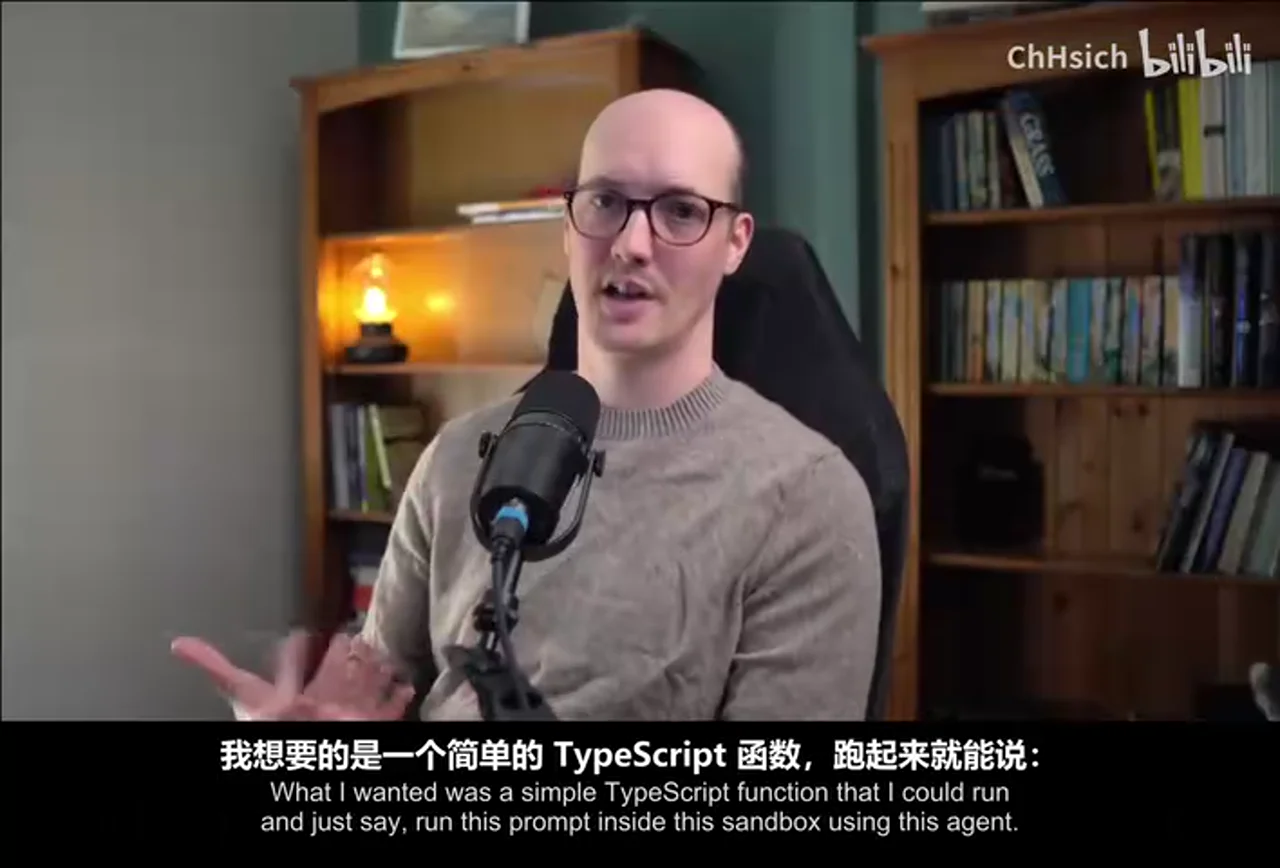
视频内容: Matt Pocock 介绍了开源工具 Sandcastle:它把 Claude Code、Codex 等编码 Agent 放进隔离沙箱,并用 TypeScript 与 Markdown prompt 编排成可重复的软件开发流程。视频演示的模板以 GitHub Issues 作为任务积压:planner 读取待办并选择未阻塞任务,多个 implementer 在各自分支和沙箱中工作,有提交时再交给 reviewer,最后由 merger 汇总分支、执行检查并关闭 Issue。重点不是某个固定工作流,而是让团队用代码拥有并修改自己的 Agent 流程。
这套方法试图同时解决两个问题:一是无人值守 Agent 不能直接获得宿主机的无限权限,因此需要 Docker/Podman 等沙箱;二是单次对话难以表达规划、并行实现、复审和合并等组织关系,因此要把每一阶段的输入、输出、日志和分支显式化。视频中的演示运行确实展示了 planner、implementer、reviewer 与 merger 的日志,以及一次 TypeScript 脚手架任务从 Issue 到合并、测试和关闭的全过程;但这只是一次示范,不代表任意仓库、任务或模型都能稳定无人值守完成。
工作流的关键结构
- 任务入口: GitHub Issues 提供可持久化的 backlog;planner 根据 issue 内容、标签、评论与依赖关系选择可执行任务。
- 隔离执行: 每项实现工作进入独立 sandbox 和分支,避免 Agent 直接操作宿主环境,也降低并行任务互相污染的概率。
- 角色分离: implementer 负责生成变更;有提交后 reviewer 读取 diff 并按项目标准复审;merger 接收完成分支与 Issue 上下文,处理合并、检查和收尾。
- 流程即代码:
main.mts、prompt 文件、Agent 类型、并行策略和分支/PR 策略都可修改。Sandcastle 提供原语与模板,而非强制规定唯一的软件工程方法。 - 可观测性: 每个 Agent 的日志、上下文使用情况、命令和阶段结果可被查看,使失败比一段长对话更容易定位。
外部核验与边界
外部核验补充: Sandcastle 官方仓库确认目前支持以 GitHub Issues 等 tracker 作为任务入口,并可在初始化时生成 Docker 配置;Docker 是可选后端,不是唯一后端。Sandcastle 官方 README · 初始化说明
官方 parallel-planner-with-review 模板也确认了 planner、按任务启动的 implementer、条件式 reviewer 与 merger 阶段。官方 main.mts 模板 但视频所说“读取带 Sandcastle 标签的全部开放 Issue 字段”取决于生成版本和 tracker adapter;当前模板把检索抽象为 LIST_TASKS_COMMAND,不应视为所有配置的固定行为。动态 GitHub 上下文说明
同样,merger 的目标是宿主当前目标分支,通常可以是 main,但并非硬编码永远合入 main;它能拿到分支和任务元数据、运行类型检查与测试,也不能由此推出合并结果在业务上必然正确。merge prompt
与相关笔记的连接
当 AI 开始编排工程:一个可观测的软件工厂如何运转从控制面解释提示、工具调用、门禁与运行记录应如何进入可审计流程;本视频提供了一个更具体的 TypeScript、沙箱、分支和 Issue 编排实例。组合阅读可以把“可观测的软件工厂”从原则映射到实际工作流结构。
多 Agent 系统从 Loop 到 Graph强调执行、验证、否决和换路权不应集中在同一个 Loop;Sandcastle 模板中的 implementer、reviewer、merger 正是这种角色分离的具体实现。不过,角色名称本身不保证真正独立,可靠性仍取决于上下文、权限、门禁与失败路径是否分开。
黑灯软件工厂的致命诱惑补上了本视频较少展开的长期风险:测试通过和自动合并不等于团队持续理解架构。两篇合读后的结论不是“拒绝 AFK Agent”,而是让自治范围服从可验证能力,并对高风险或架构性改动保留人工判断。
辅助理解
辅助理解:Sandcastle 是运行原语,不是可靠性保证
视频内容: Sandcastle 将“调用一个编码 Agent”提升为“用程序组织多个受约束的 Agent 运行”。示例工作流可以概括为:planner 把 backlog 变成计划,implementer 并行产出分支,reviewer 检查各自的 diff,merger 汇总通过的结果。每个节点的 prompt、Agent 类型和分支策略都能由工程师修改。
flowchart TD
    I["GitHub Issues / 任务积压"] --> P["Planner\n读取上下文并选择未阻塞任务"]
    P --> E1["Implementer A\n独立沙箱 + 分支"]
    P --> E2["Implementer B\n独立沙箱 + 分支"]
    E1 --> R1{"有提交且复审通过?"}
    E2 --> R2{"有提交且复审通过?"}
    R1 -->|是| M["Merger\n汇总分支与任务上下文"]
    R2 -->|是| M
    R1 -->|否| F1["修复、放弃或升级给人"]
    R2 -->|否| F2["修复、放弃或升级给人"]
    M --> G["类型检查 / 测试 / 合并"]
    G -->|通过| C["更新或关闭 Issue"]
    G -->|冲突或失败| H["Merger 处理或人工介入"]
AI 辅助推断: 图中的“复审通过”“失败升级”和“人工介入”是把视频机制整理成较安全的工程模型,并非视频演示已完整证明的生产策略。真正的 Graph 不只是同时启动多个 Agent,而是每个检查结果能够退回、阻断或改变路径。
1. 为什么先解决沙箱,再谈 AFK
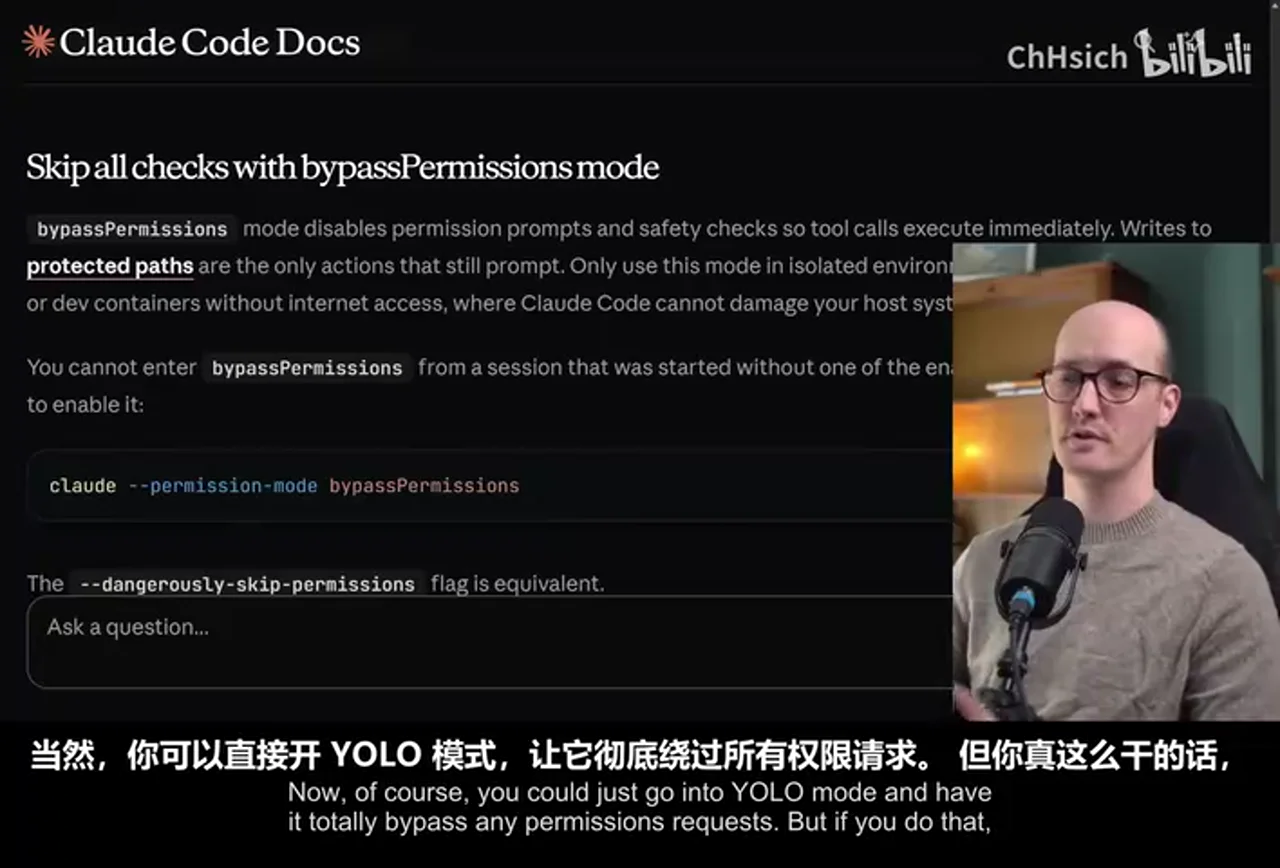
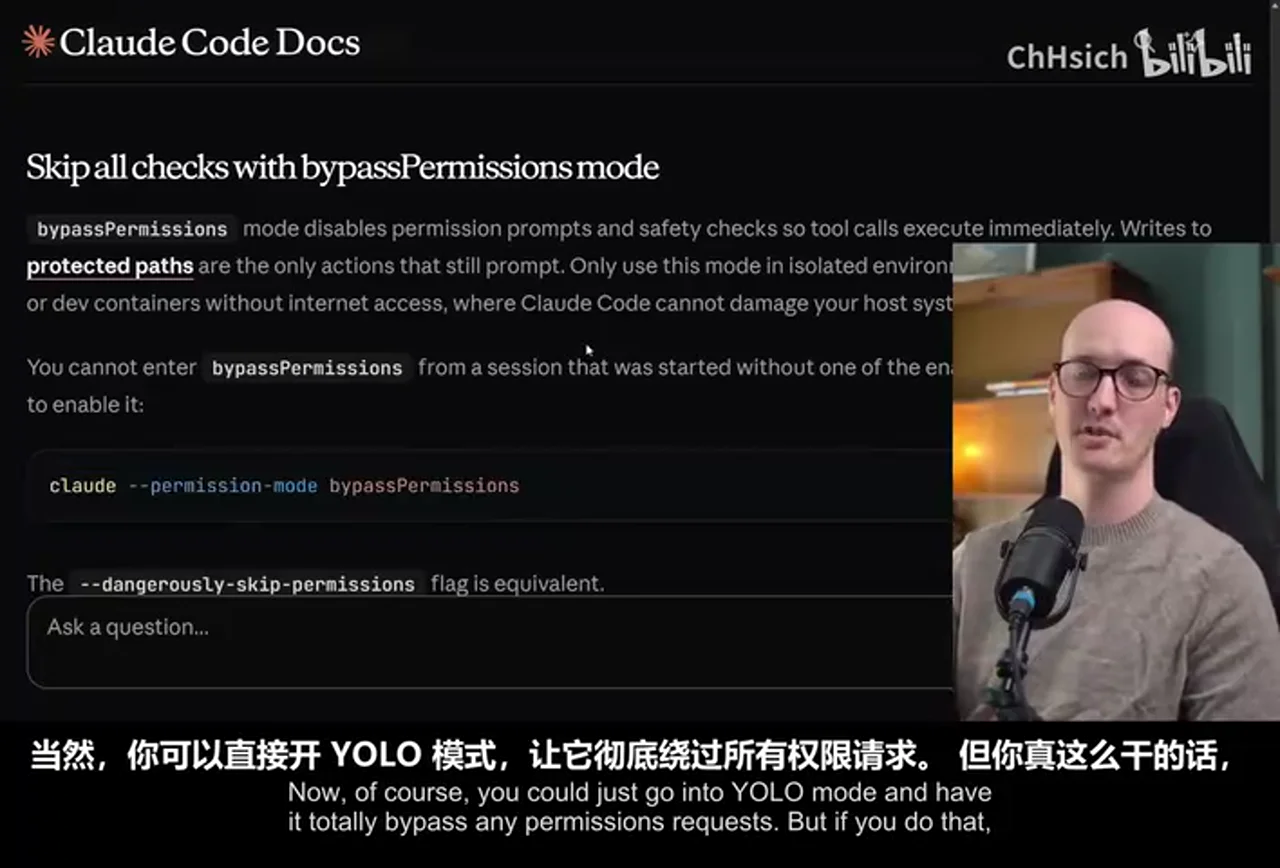
视频从 Claude Code 的 bypassPermissions 风险切入:若为了无人值守直接绕过权限确认,Agent 可能读取敏感文件或执行大范围宿主机操作。画面中的官方文档明确把绕过权限与安全风险并列,是理解 Sandcastle 动机最直接的一帧。
视频内容: Sandcastle 示例通过 Dockerfile 准备 GitHub CLI、Agent 用户及编码 Agent CLI 等运行条件,把任务所需能力装进隔离环境,而不是把整台主机交给模型。
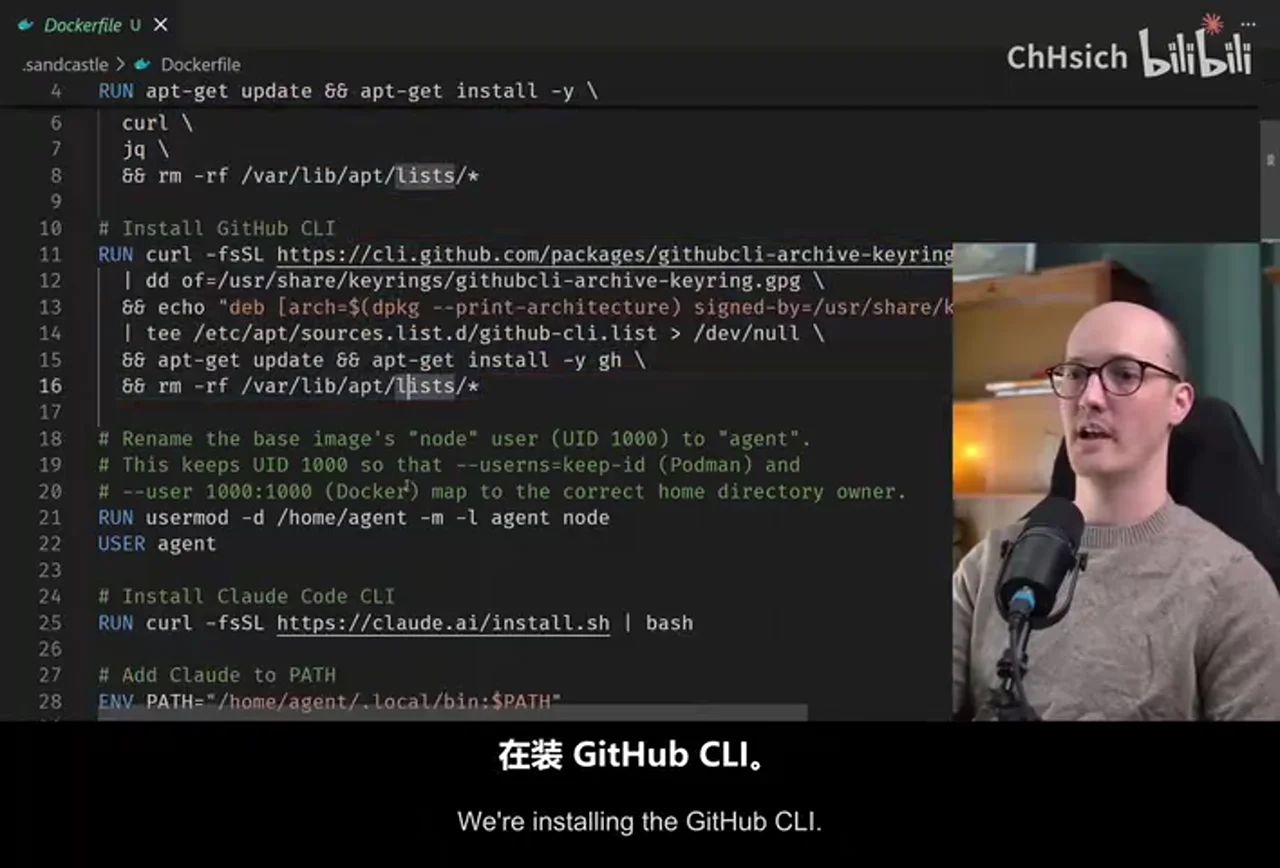
沙箱降低的是权限和环境污染风险,不会自动解决网络外传、凭据注入、镜像供应链、资源消耗或生成代码正确性。若工作流需要 GitHub 权限,仍应使用最小权限凭据、限定仓库范围,并为网络、文件系统、CPU、时长和预算设置边界。
2. “自动接单”其实是可持久化任务状态
终端日志同时展示 planner 的 Issue 规划和 implementer 的独立执行,使任务不再只存在于一段聊天上下文里。
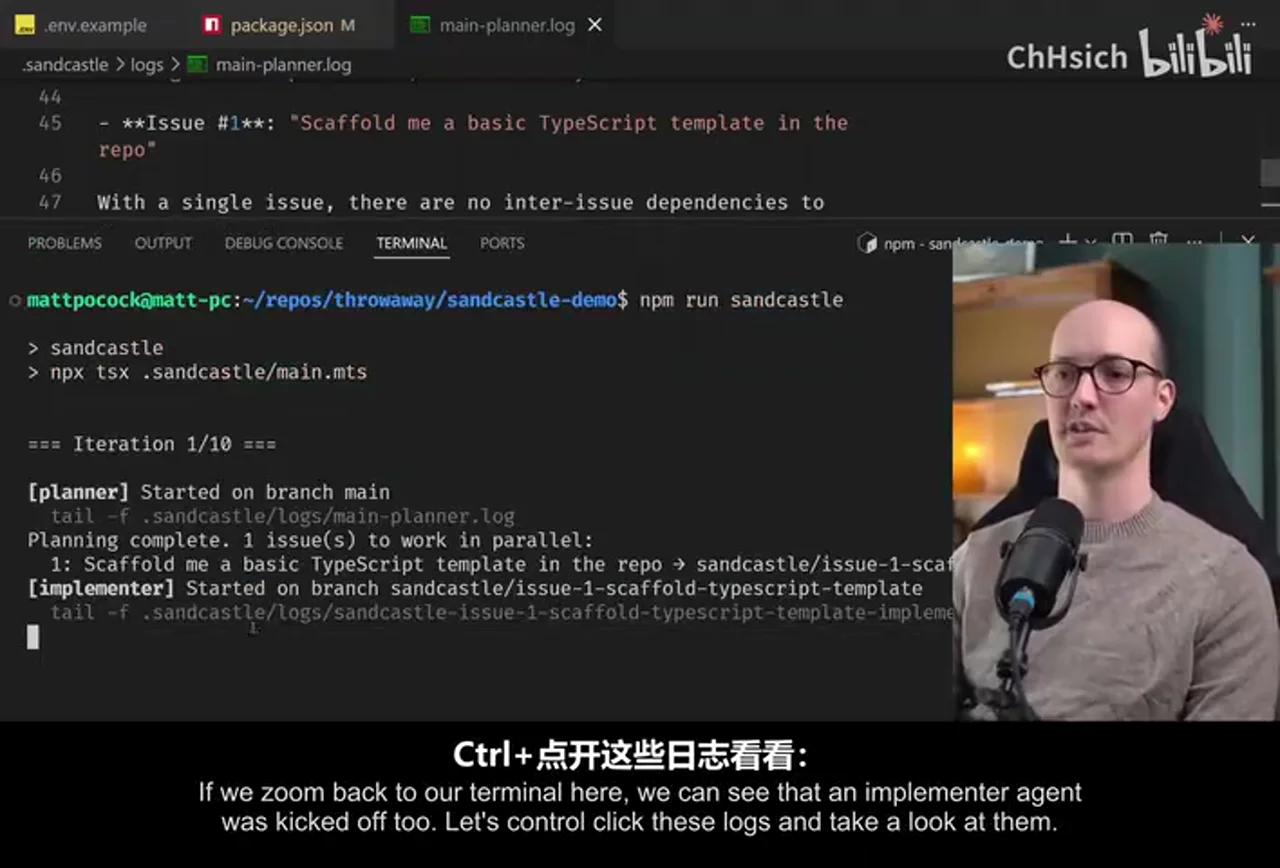
外部核验补充: 官方 README 确认 GitHub Issues 是可选 tracker,planner 示例可读取开放任务;这支持“用 Issue 作为 AFK backlog”的能力,但不保证每次规划都能识别真实依赖或正确判断阻塞关系。Sandcastle 官方 README
从工程角度看,Issue 的价值不只是“接单”,还在于任务有稳定 ID、可追加评论、可观察状态,并能把最终 commit/branch 与原始需求重新关联。planner 输出结构化计划后,每个任务才进入自己的执行上下文,从而为并行和局部失败恢复创造条件。
3. 实现、复审与合并为何要分开
main.mts 画面显示 Promise.allSettled、sandbox.run、根据提交数量启动 reviewer,以及最终汇总实现/复审提交。这是本视频最能说明架构的一帧。
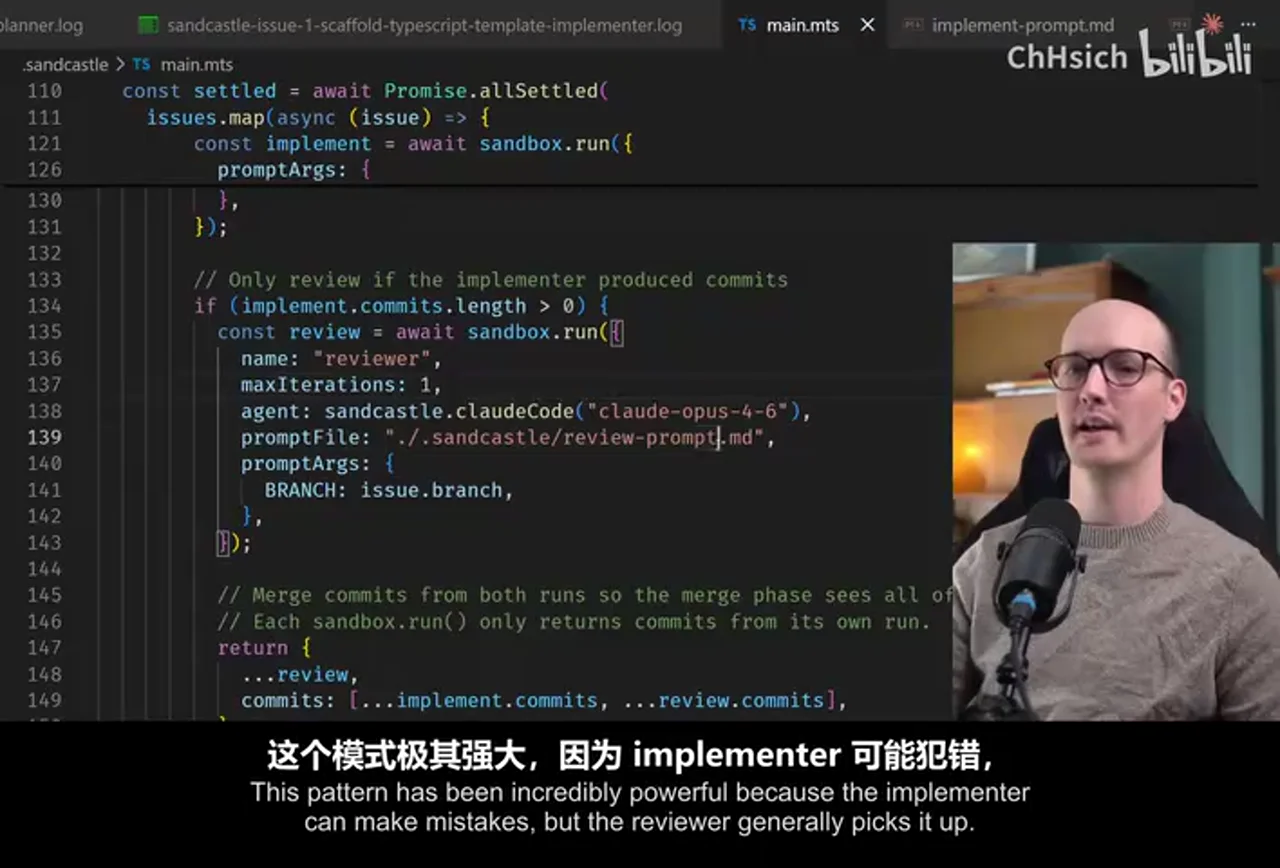
视频内容: implementer 可能犯错,因此作者让 reviewer 读取 diff、检查正确性和维护性,并允许写入项目编码标准;merger 再接收分支与 Issue 信息,解决冲突并运行检查。官方模板源码确认这三个阶段存在,但“换一个角色”不等于自动获得独立判断:若 reviewer 继承了 implementer 的全部假设、使用相同薄弱测试或没有否决权,复审仍可能只是重复确认。官方 main.mts 模板
最终日志显示该次演示完成了分支合并、类型检查、测试与 Issue 关闭。
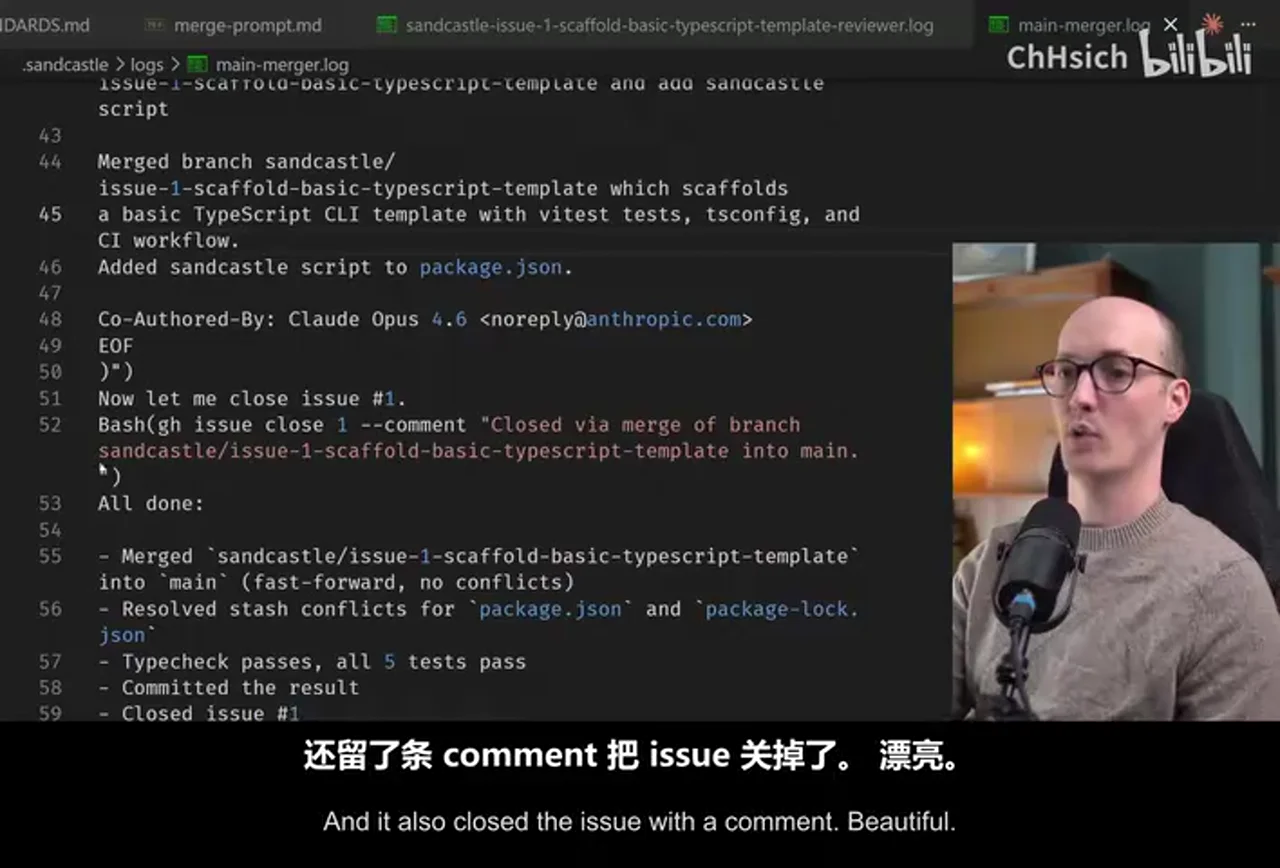
这只能证明录制中的一次运行轨迹。类型检查和测试是必要证据,但覆盖范围之外的架构退化、需求误解和安全问题仍可能存在。较稳妥的做法是按风险决定是否自动合并:局部、可回滚且验收清晰的任务可提高自治;公共 API、认证、计费、迁移与大范围架构变更则应保留人工闸口。
观众讨论与补充
本次只抓取到 4 条顶层热门评论、0 条当前可访问弹幕,不含楼中楼,样本极小,不能代表整体观众情绪,也不能把点赞或热度当作事实证据。
- 一位观众提出以统一的调度 skill 接收需求、再分派其他能力。这是“在 Sandcastle 工作流之上再设控制平面”的实践设想,但没有提供可复现实验或安全边界。
- 另一位观众追问 AFK 执行的 Token 成本。这个问题揭示了视频未展开的运营约束:AI 辅助推断认为生产流程还应显式设置预算上限、停止条件、重试次数和任务收益门槛;这不是评论或视频已经验证的结论。
因此,评价“全自动软件工厂”不能只看代码吞吐量,还应同时记录每个 Issue 的模型成本、人工复审时间、失败/返工率和未被测试捕获的缺陷。
外部事实核验
声明 1(02:29)
- 视频陈述:Sandcastle can use GitHub Issues as a backlog manager for AFK agents.
- 核验状态:已确认
- 核验结果:Confirmed. Sandcastle’s official documentation lists GitHub Issues as one of the issue trackers selectable during initialization, and its planner examples read open issues through the GitHub CLI. This verifies supported task intake, not that every unattended run will complete those issues correctly.
- 检索日期:2026-08-14
- 来源:
声明 2(03:08)
- 视频陈述:The generated setup uses a Dockerfile and Docker container to isolate the agent workflow.
- 核验状态:已确认
- 核验结果:Confirmed for the Docker option shown in the video. The official init documentation says choosing Docker scaffolds
.sandcastle/Dockerfile, and the orchestration template uses the Docker sandbox provider. Sandcastle also supports Podman, so Docker is an available generated setup rather than the only possible backend. - 检索日期:2026-08-14
- 来源:
声明 3(06:18)
- 视频陈述:The generated main.mts workflow defines separate planner, implementer, reviewer, and merger stages.
- 核验状态:已确认
- 核验结果:Confirmed. The official
parallel-planner-with-reviewtemplate names a planner, starts an implementer for each planned issue, conditionally starts a reviewer in the same sandbox, and then runs a merger over completed branches. The source comments describe this as plan, execute-and-review, and merge phases. - 检索日期:2026-08-14
- 来源:
声明 4(06:46)
- 视频陈述:The planner fetches open issues carrying the Sandcastle label, including labels, comments, and bodies, then selects unblocked work.
- 核验状态:部分确认
- 核验结果:Partially confirmed. The official documentation gives a GitHub CLI command that fetches open
Sandcastle-labelled issues with number, title, body, comments, and labels, while the official planner prompt constructs a dependency graph and emits unblocked issues. The current template abstracts issue retrieval behindLIST_TASKS_COMMAND, so the exact filter and fields depend on the selected tracker adapter and generated version. - 检索日期:2026-08-14
- 来源:
声明 5(09:08)
- 视频陈述:After branch work completes, a merger agent receives the branches and associated issues and merges changes into main.
- 核验状态:部分确认
- 核验结果:Partially confirmed. The official template passes completed branches and issue metadata to a merger agent, whose prompt merges each branch, runs type checking and tests, and closes the corresponding issues. It merges into the host’s current target branch; that branch is commonly
mainbut is not hard-coded tomain. - 检索日期:2026-08-14
- 来源:
Data
增强转写稿
[00:00] 我的目標是,在過去6個月,我試過找我的執行者 [00:03] 我的執行者們,為全AFK延續 [00:06] 這些AFK執行者們,為全AFK延續 [00:07] 為全AFK延續,為全AFK延續 [00:08] 為全AFK延續,為全AFK延續 [00:10] 為全AFK延續,為全AFK延續 [00:11] 正常地,他們正在延續 [00:13] 正常地,他們正在延續 [00:15] 正常地,他們正在延續 [00:16] 不過,為了能夠讓他們延續 [00:18] 正常地,他們正在延續 [00:19] 他們需要延續 [00:20] 他們需要延續 [00:21] 還有一個問題,你應該有的 [00:23] 是,我能夠讓我的執行者 [00:25] 不然你就可以去YOLO模式 [00:27] 和完全供應任何供應項目 [00:30] 但如果你做到的話 [00:31] Claude會做很大的事情在你系統上 [00:33] 例如打開家庭領事領事項目 [00:38] 如果你在一個領事領事項目 [00:40] 就可能會有關你擔任的資料 [00:43] 或把你的領事項目送到一間第三個派對 [00:45] 所以在想要讓AFC領事領事領事領事領事項目 [00:48] 你必須要成為SANBOXED [00:50] 還有很多方式的方式 [00:53] 但我並沒有特別高興過任何領事項目 [00:57] 我真的用的項目 [01:00] 並嘗試製作Docker sandboxes [01:02] 雖然有很多問題 [01:04] 但在AFC領事項目上 [01:05] 我不會揭曉你現在 [01:07] 我想要的就是 [01:07] 一個簡單的領事項目 [01:09] 讓我能領事項目 [01:10] 然後就說 [01:11] 領事項目 [01:12] 在這個SANBOX領事項目 [01:14] 使用這個領事項目 [01:15] 所有的領事項目 [01:16] 都在想要送給我第三個派對 [01:19] 所以我發現 [01:20] 我必須要建立一個領事項目 [01:21] 那個領事項目是SANcastle [01:23] 一個領事項目 [01:24] 用AICoding的領事項目 [01:26] 進行解鎖 [01:27] 你可以使用這個領事項目 [01:31] 讓你領事項目 [01:32] 把領事項目 [01:34] 把SANBOX領事項目 [01:35] 把領事項目領事項目 [01:36] 如果你有任何的領事項目 [01:39] 你會看到這個領事項目 [01:41] 或Docker sandboxle的領事項目 [01:43] 有一個主領事項目 [01:45] 這個領事項目 [01:46] 是Docker sandboxle.run的領事項目 [01:49] 這個領事項目 [01:50] 你可以建立一個領事項目 [01:53] 你可以建立項目 [01:54] 把領事項目的項目 [01:56] 將領事項目擺在一旁 [01:57] 你可以建立項目 [01:58] 把領事項目的項目 [02:00] 將領事項目擺在一旁 [02:01] 我真的很喜歡使用這個項目 [02:05] 現在我覺得是時間 [02:06] 拍攝一段影片 [02:07] 讓我示範一下 [02:07] 這個領事項目的領事項目 [02:09] 我們先用NPM install AI Hero [02:11] SANcastle [02:12] 當做了這個領事項目 [02:12] 我們可以用NPX [02:13] SANcastleinit [02:15] 你會想要選擇領事項目 [02:16] 先選擇Claw Code [02:18] 為何不 [02:18] 你可以選擇 [02:19] 我們先選擇SANbox的領事項目 [02:20] 讓我們選擇領事項目 [02:22] 我的計劃在未來 [02:22] 是更多更多領事項目 [02:25] 而且你也可以選擇 [02:26] 自己的領事項目 [02:27] 現在我們先選擇Docker [02:29] SANcastle也會使用 [02:30] Backlog Manager [02:31] 因為AFK agents [02:32] 需要某些方式 [02:34] 選擇領事項目 [02:35] 然後知道什麼要做 [02:36] 我最擔心的方式 [02:37] 是GitHub issues [02:39] 我們現在也有5個領事項目 [02:41] 我們現在有5個領事項目 [02:41] 可能有更多領事項目 [02:43] 在時間你做這個領事項目 [02:44] 我們其實來採訪 [02:45] 我們來採訪 [02:46] 我們來採訪的領事項目 [02:49] 然後我們選擇GitHub issues [02:50] 我們會創造 [02:51] SANcastle Github Label [02:53] 領事項目會設定 [02:54] 領事項目這項目 [02:55] 這項目的主要是 [02:56] SANcastle Label [02:57] 在領事項目的領事項目 [02:59] 會選擇領事項目 [03:00] 我們可以看到 [03:02] 某些領事項目 [03:03] 在SANcastle的領事項目 [03:06] 就在這個領事項目上 [03:07] 現在要知道的問題 [03:08] 是這個Docker file [03:10] 這個領事項目 [03:11] 是Docker container [03:12] 或是領事項目 [03:13] 來設定Docker container [03:15] 我們會使用的 [03:16] SANcastle的領事項目 [03:17] 在這個Docker container [03:19] 這項目的主要是 [03:19] 我們可以設定 [03:20] 任何領事項目 [03:21] 我們設定了 [03:22] 一些重要的領事項目 [03:23] 我們設定了GitHub CLI [03:25] 我們做了一些設定 [03:27] 來承認領事項目的領事項目 [03:30] 我們設定了 [03:31] 領事項目的領事項目 [03:31] 然後我們就準備好了 [03:33] 所以我們來建立 [03:35] 這個領事項目的領事項目 [03:36] 那領事項目很快 [03:37] 然後它現在完成了 [03:39] 接下來我們要設定 [03:40] 領事項目的領事項目 [03:42] 領事項目/.env [03:44] 我們設定了領事項目的項目 [03:46] 我們設定了領事項目的項目 [03:48] 領事項目/.env [03:50] 我們可以看到 [03:51] 領事項目的領事項目 [03:52] 還有領事項目的項目 [03:54] 如果你想使用 [03:55] Claude的領事項目 [03:56] 不論領事項目 [03:57] 你可以去這個領事項目 [03:58] 那會告訴你 more about it [04:00] 如果你不知道 [04:01] 領事項目 [04:01] 是有點噁心 [04:03] 使用領事項目的項目 [04:04] 這些項目的項目 [04:05] 所以有些領事項目的領事項目 [04:07] 我對這些領事項目 [04:09] 和一些領事項目的領事項目 [04:11] once that’s done I’m going to go into my source control [04:14] I’m going to commit this code [04:15] and I’m going to push it up [04:16] because I’m going to show you how we can use [04:19] GitHub Issues to schedule some work [04:22] for this agent that we’ve created [04:23] so let’s go to our repo and create a new issue [04:26] let’s say [04:27] scaffold me a basic typescript template in the repo [04:29] give me a basic typescript application [04:31] that uses Vitest [04:33] that uses type checking [04:34] that has a very very simple CLI [04:37] that I can call [04:38] use commander for the CLI [04:40] script that does type checking [04:41] and runs the tests [04:42] so now I’m going to create that issue [04:44] and we can now run our agent to see what happens [04:47] so after that it should be ready to be picked up [04:49] first I’m going to add this little piece of code [04:52] to my package.json here [04:54] which is just going to allow me to run a script here [04:57] so let’s say scripts [04:58] and then add this Sandcastle script here [05:00] this is just going to run npx tsx [05:03] and tsx is just a way [05:04] that you can run typescript as a script [05:07] and it’s going to run this file [05:08] .sandcastle/main.mts [05:10] so let’s actually go ahead [05:11] and run this [05:12] and see what happens [05:14] we can see immediately [05:15] that it’s kicked off a planner agent here [05:17] and we can control click these logs [05:18] to see what it’s up to [05:20] we can see that it’s successfully set up the sandbox [05:22] it’s the planner agent running on docker [05:25] and it’s looking at the open issues here [05:27] and it sees that there’s only one open issue [05:29] it then spits out this plan here [05:31] which is a set of issues [05:33] which are going to be worked on [05:34] finally at the bottom here [05:35] it shows the amount of context window [05:36] that it used [05:37] if we zoom back to our terminal here [05:39] we can see that an implementer agent [05:41] was kicked off too [05:42] let’s control click these logs [05:43] and take a look at them [05:45] and we can see that it called [05:46] GitHub issue #1 [05:48] it has a clear picture [05:49] and it asked for a basic typescript script [05:51] with Vitest for testing type checking [05:53] simple cli using commander [05:55] great [05:55] we can see that it’s running bash commands [05:57] inside here [05:58] it’s doing good dependencies installed [06:01] and I’ve even got it prompted [06:02] so it’s doing a little bit of [06:03] redgreen refactor here [06:04] where it’s writing the test first [06:06] Vitest run etc [06:07] we can see it all happening [06:08] it’s now moved on a little bit further [06:10] and we can sit and watch this [06:11] if we want to [06:12] or we can go and have a cup of tea [06:14] we can relax [06:15] and this will just do its work without us [06:18] so while this is running [06:19] why don’t we go and have a look [06:20] at the main.mts file here [06:22] we can see the planner [06:23] that we saw earlier [06:24] is just down here [06:25] where we have a [06:25] sandcastle.run command [06:27] that takes in a name of planner [06:29] it takes in an agent here [06:31] so we can just change this [06:32] if we want to [06:33] if we want to do [06:33] planning with codex [06:35] let’s say instead of Claude Code [06:37] we totally can [06:37] and it’s also using this [06:39] prompt file here [06:40] so plan prompt in here [06:42] this is scaffolded by the template [06:43] and you can totally edit this [06:44] as much as you want to [06:46] to run anything inside a sandbox [06:48] this one is taking all of the open issues [06:50] from the repo [06:51] that have the label sandcastle [06:53] it’s grabbing all of the labels [06:54] all the comments [06:55] grabbing all of the comments body as well [06:57] and then it’s working out [06:57] which ones can be done right now [07:00] so it’s only looking for [07:01] unblocked issues here [07:03] and finally we tell it to output its plan [07:05] in JSON object [07:06] wrapped in plan tags [07:07] if we go back to main.mts [07:08] we can see that this [07:09] then gets picked up here [07:11] we then grab the JSON [07:12] out of the plan here [07:13] and figure out the issues [07:14] and then for each of the issues [07:16] we run a [07:18] separate sandbox here [07:19] we run an implementer [07:20] and this one has an implement prompt [07:22] that’s just inside here [07:23] so implement prompt [07:25] this one takes in some prompt arguments here [07:27] so it takes in an issue title [07:29] it takes in the task ID [07:30] which is the issue ID [07:31] then it says you’re going to be working [07:32] on a specific branch [07:34] again all of this is just a setup [07:37] that I cooked up [07:38] really this is not [07:39] Sandcastle giving you [07:40] any kind of prescription [07:41] on how you want to run it [07:43] this is just a really cool workflow [07:44] that I tend to use in my repos [07:46] so I figured it belonged in a template [07:48] if we zoom back to main.mts [07:49] we can see that the result [07:51] here is captured in a variable [07:53] and if there are more than one [07:54] commits here [07:55] we then run a reviewer [07:57] this pattern has been [07:58] incredibly powerful [08:00] because the implementer [08:01] can make mistakes [08:01] but the reviewer [08:02] generally picks it up [08:03] and of course [08:04] if you want to do an adversarial review [08:06] where you have one agent [08:07] run another [08:08] or review another agent’s code [08:10] then you can just do [08:11] sandcastle.codex [08:12] if you want to have multiple different agents [08:15] spawn at the same time [08:16] come up with an implementation [08:17] and then some other reviewer [08:18] takes all of those branches [08:20] chooses the best one [08:21] or makes a [08:22] like a mix of them [08:23] you can [08:23] that’s the power of having [08:24] a totally agnostic setup [08:26] to what agent you’re running [08:27] that’s the power of using your [08:29] or owning your own process [08:30] anyway let’s take a look [08:31] at the review prompt here [08:33] it’s worth noting this little [08:34] syntax here [08:35] because this is really nice [08:36] this is something I copied [08:37] from Claude Skills [08:39] where if you specify [08:40] an exclamation mark [08:41] before a bunch of [08:42] backticks here [08:43] it will run this [08:44] when it’s resolving [08:45] the prompt [08:46] and so it will actually [08:47] execute [08:47] git diff source branch [08:49] branch here [08:49] this review prompt [08:50] just uses a very basic process [08:52] understands the change [08:53] analyse it for improvements [08:54] check correctness [08:55] maintain balance [08:56] and crucially it’s a great step [08:58] for like adding [08:59] your own project standards [09:00] so for instance I’ve added [09:01] this coding standards [09:02] in here [09:03] that you can fill in [09:04] with any project standards [09:05] that you want to be added [09:06] let’s look back [09:07] at main.mts [09:08] and we can see what happens [09:09] after all of these [09:10] branches get created [09:11] we can see that they then [09:12] get passed into [09:14] a merger agent [09:15] down the bottom [09:16] and this one takes [09:16] all of the branches [09:17] takes all of the resulting [09:18] issues [09:18] so it understands [09:19] the changes [09:20] that were made [09:20] and then merges them [09:21] back to the main branch [09:23] the reason we use [09:23] an agent for this [09:24] is that there might be [09:25] merge conflict [09:26] between them [09:26] and I usually like to have [09:27] a really powerful agent [09:29] handling those merge conflicts [09:30] for me [09:31] because they can sometimes [09:31] be pretty gnarly [09:32] and so at the end of [09:33] this we have had [09:34] multiple agents [09:35] running at the same time [09:36] all committing to [09:37] their branches [09:38] and then we get [09:39] a like a senior [09:40] merger developer [09:41] to pull them back [09:42] into main [09:42] just this setup [09:43] has massively [09:44] increased my velocity [09:45] and it works [09:45] superduper well [09:46] and again [09:47] Sandcastle is not [09:48] opinionated here [09:48] if you wanted to [09:49] make these [09:50] into PR branches [09:51] you totally could [09:52] ok let’s go and check [09:53] in with our [09:53] running process [09:54] and let’s see [09:54] what happened [09:55] all right [09:56] we can see [09:57] that we had [09:57] an implementer [09:58] kickoff here [09:59] then a reviewer [10:00] let’s check the logs [10:01] for the reviewer [10:02] we can see that it found [10:02] that the code was [10:03] already clean [10:04] and well structured [10:05] minimal [10:05] scaffold template [10:06] naming is clear [10:07] then let’s see [10:07] what happened [10:08] in the merge [10:09] so we can just [10:10] pull up the [10:10] merger here [10:11] and the merger [10:12] ran the type checks [10:14] it merged [10:14] in the branch [10:16] and it also [10:16] closed the issue [10:17] with a comment [10:18] beautiful [10:19] we can see too [10:19] that if we go [10:20] and have a look [10:20] at the rest [10:21] of our code base here [10:22] whoa [10:23] we now have [10:23] a bit more code [10:24] going on [10:24] we have [10:25] a tsconfig.json [10:26] we have a vtest.config.ts [10:28] and we have [10:28] a few files [10:29] not going about [10:29] inside the CLI here [10:31] so you can start [10:31] to see [10:32] how [10:32] Sandcastle [10:33] is working here [10:34] you can build [10:34] these relatively [10:35] complicated flows [10:36] using a [10:36] simple primitive [10:37] using really [10:38] nice [10:38] ergonomic [10:39] markdown prompts [10:40] you can get [10:40] it to run [10:41] on different branches [10:42] and just [10:42] merge [10:43] that back into main [10:44] or you can [10:44] get it to do [10:45] really nice [10:45] pr flows [10:46] as well [10:47] you know [10:47] it’s just [10:48] code [10:48] it is a [10:48] programmatic way [10:50] to run [10:50] Claude Code [10:51] to run [10:52] codex [10:52] and to build [10:53] these workflows [10:54] that turn [10:54] into these [10:55] mini [10:55] software [10:56] factories [10:57] I’ve been [10:57] incredibly [10:58] happy with it [10:59] and I’m [10:59] really excited [10:59] to see [11:00] what you build [11:00] with it too [11:01] if you’re thinking [11:01] about [11:01] these hard [11:02] problems [11:02] too [11:03] then you should [11:03] check out [11:03] my newsletter [11:04] for AI [11:05] skills [11:05] for real [11:05] engineers [11:06] these follow [11:06] the skills [11:07] repo [11:07] that went [11:08] absolutely [11:08] viral [11:09] a few days [11:09] go [11:10] and I also [11:10] post tips [11:10] and tricks [11:11] there [11:11] for getting [11:11] the most [11:12] out [11:12] of agents [11:13] using [11:14] good old [11:14] software [11:14] fundamentals [11:15] so thanks [11:15] for watching [11:15] folks [11:16] I’m really [11:16] excited [11:16] about this tool [11:17] I think [11:17] it’s gonna [11:18] be [11:18] a [11:18] really [11:19] nice contribution [11:19] to the ecosystem [11:20] and I’ve [11:21] been loving [11:21] using it [11:22] so [11:22] nice work [11:23] and I’ll [11:23] see you [11:23] in the next one.
原始转写稿
[00:00] 我的目標是,在過去6個月,我試過找我的執行者 [00:03] 我的執行者們,為全AFK延續 [00:06] 這些AFK執行者們,為全AFK延續 [00:07] 為全AFK延續,為全AFK延續 [00:08] 為全AFK延續,為全AFK延續 [00:10] 為全AFK延續,為全AFK延續 [00:11] 正常地,他們正在延續 [00:13] 正常地,他們正在延續 [00:15] 正常地,他們正在延續 [00:16] 不過,為了能夠讓他們延續 [00:18] 正常地,他們正在延續 [00:19] 他們需要延續 [00:20] 他們需要延續 [00:21] 還有一個問題,你應該有的 [00:23] 是,我能夠讓我的執行者 [00:25] 不然你就可以去YOLO模式 [00:27] 和完全供應任何供應項目 [00:30] 但如果你做到的話 [00:31] Claude會做很大的事情在你系統上 [00:33] 例如打開家庭領事領事項目 [00:38] 如果你在一個領事領事項目 [00:40] 就可能會有關你擔任的資料 [00:43] 或把你的領事項目送到一間第三個派對 [00:45] 所以在想要讓AFC領事領事領事領事領事項目 [00:48] 你必須要成為SANBOXED [00:50] 還有很多方式的方式 [00:53] 但我並沒有特別高興過任何領事項目 [00:57] 我真的用的項目 [01:00] 並嘗試製作Docker sandboxes [01:02] 雖然有很多問題 [01:04] 但在AFC領事項目上 [01:05] 我不會揭曉你現在 [01:07] 我想要的就是 [01:07] 一個簡單的領事項目 [01:09] 讓我能領事項目 [01:10] 然後就說 [01:11] 領事項目 [01:12] 在這個SANBOX領事項目 [01:14] 使用這個領事項目 [01:15] 所有的領事項目 [01:16] 都在想要送給我第三個派對 [01:19] 所以我發現 [01:20] 我必須要建立一個領事項目 [01:21] 那個領事項目是SANcastle [01:23] 一個領事項目 [01:24] 用AICoding的領事項目 [01:26] 進行解鎖 [01:27] 你可以使用這個領事項目 [01:31] 讓你領事項目 [01:32] 把領事項目 [01:34] 把SANBOX領事項目 [01:35] 把領事項目領事項目 [01:36] 如果你有任何的領事項目 [01:39] 你會看到這個領事項目 [01:41] 或Docker sandboxle的領事項目 [01:43] 有一個主領事項目 [01:45] 這個領事項目 [01:46] 是Docker sandboxle.run的領事項目 [01:49] 這個領事項目 [01:50] 你可以建立一個領事項目 [01:53] 你可以建立項目 [01:54] 把領事項目的項目 [01:56] 將領事項目擺在一旁 [01:57] 你可以建立項目 [01:58] 把領事項目的項目 [02:00] 將領事項目擺在一旁 [02:01] 我真的很喜歡使用這個項目 [02:05] 現在我覺得是時間 [02:06] 拍攝一段影片 [02:07] 讓我示範一下 [02:07] 這個領事項目的領事項目 [02:09] 我們先用NPM install AI Hero [02:11] SANcastle [02:12] 當做了這個領事項目 [02:12] 我們可以用NPX [02:13] SANcastleinit [02:15] 你會想要選擇領事項目 [02:16] 先選擇Claw Code [02:18] 為何不 [02:18] 你可以選擇 [02:19] 我們先選擇SANbox的領事項目 [02:20] 讓我們選擇領事項目 [02:22] 我的計劃在未來 [02:22] 是更多更多領事項目 [02:25] 而且你也可以選擇 [02:26] 自己的領事項目 [02:27] 現在我們先選擇Docker [02:29] SANcastle也會使用 [02:30] Backlog Manager [02:31] 因為AFK agents [02:32] 需要某些方式 [02:34] 選擇領事項目 [02:35] 然後知道什麼要做 [02:36] 我最擔心的方式 [02:37] 是GitHub issues [02:39] 我們現在也有5個領事項目 [02:41] 我們現在有5個領事項目 [02:41] 可能有更多領事項目 [02:43] 在時間你做這個領事項目 [02:44] 我們其實來採訪 [02:45] 我們來採訪 [02:46] 我們來採訪的領事項目 [02:49] 然後我們選擇GitHub issues [02:50] 我們會創造 [02:51] SANcastle Github Label [02:53] 領事項目會設定 [02:54] 領事項目這項目 [02:55] 這項目的主要是 [02:56] SANcastle Label [02:57] 在領事項目的領事項目 [02:59] 會選擇領事項目 [03:00] 我們可以看到 [03:02] 某些領事項目 [03:03] 在SANcastle的領事項目 [03:06] 就在這個領事項目上 [03:07] 現在要知道的問題 [03:08] 是這個Docker file [03:10] 這個領事項目 [03:11] 是Docker container [03:12] 或是領事項目 [03:13] 來設定Docker container [03:15] 我們會使用的 [03:16] SANcastle的領事項目 [03:17] 在這個Docker container [03:19] 這項目的主要是 [03:19] 我們可以設定 [03:20] 任何領事項目 [03:21] 我們設定了 [03:22] 一些重要的領事項目 [03:23] 我們設定了GitHub CLI [03:25] 我們做了一些設定 [03:27] 來承認領事項目的領事項目 [03:30] 我們設定了 [03:31] 領事項目的領事項目 [03:31] 然後我們就準備好了 [03:33] 所以我們來建立 [03:35] 這個領事項目的領事項目 [03:36] 那領事項目很快 [03:37] 然後它現在完成了 [03:39] 接下來我們要設定 [03:40] 領事項目的領事項目 [03:42] 領事項目/.env [03:44] 我們設定了領事項目的項目 [03:46] 我們設定了領事項目的項目 [03:48] 領事項目/.env [03:50] 我們可以看到 [03:51] 領事項目的領事項目 [03:52] 還有領事項目的項目 [03:54] 如果你想使用 [03:55] Claude的領事項目 [03:56] 不論領事項目 [03:57] 你可以去這個領事項目 [03:58] 那會告訴你 more about it [04:00] 如果你不知道 [04:01] 領事項目 [04:01] 是有點噁心 [04:03] 使用領事項目的項目 [04:04] 這些項目的項目 [04:05] 所以有些領事項目的領事項目 [04:07] 我對這些領事項目 [04:09] 和一些領事項目的領事項目 [04:11] once that’s done I’m going to go into my source control [04:14] I’m going to commit this code [04:15] and I’m going to push it up [04:16] because I’m going to show you how we can use [04:19] get hub issues to schedule some work [04:22] for this agent that we’ve created [04:23] so let’s go to our repo and create a new issue [04:26] let’s say [04:27] scaffled me a basic typescript template in the repo [04:29] give me a basic typescript application [04:31] that uses vtest [04:33] that uses type checking [04:34] that has a very very simple CLI [04:37] that I can call [04:38] use commander for the CLI [04:40] scrypt that does type checking [04:41] and runs the tests [04:42] so now I’m going to create that issue [04:44] and we can now run our agent to see what happens [04:47] so after that it should be ready to be picked up [04:49] first I’m going to add this little piece of code [04:52] to my package.json here [04:54] which is just going to allow me to run a script here [04:57] so let’s say scripts [04:58] and then add this sankastle script here [05:00] this is just going to run npxtsx [05:03] and tsx is just a way [05:04] that you can run typescript as a script [05:07] and it’s going to run this file [05:08] .sankastle/main.mts [05:10] so let’s actually go ahead [05:11] and run this [05:12] and see what happens [05:14] we can see immediately [05:15] that it’s kicked off a planner agent here [05:17] and we can control click these logs [05:18] to see what it’s up to [05:20] we can see that it’s successfully set up the sandbox [05:22] it’s the planner agent running on docker [05:25] and it’s looking at the open issues here [05:27] and it sees that there’s only one open issue [05:29] it then spits out this plan here [05:31] which is a set of issues [05:33] which are going to be worked on [05:34] finally at the bottom here [05:35] it shows the amount of context window [05:36] that it used [05:37] if we zoom back to our terminal here [05:39] we can see that an implementer agent [05:41] was kicked off too [05:42] let’s control click these logs [05:43] and take a look at them [05:45] and we can see that it called [05:46] githubissuevue1 [05:48] it has a clear picture [05:49] and it asked for a basic typescript script [05:51] outvtest for testing type checking [05:53] simple cli using commander [05:55] great [05:55] we can see that it’s running bash commands [05:57] inside here [05:58] it’s doing good dependencies installed [06:01] and I’ve even got it prompted [06:02] so it’s doing a little bit of [06:03] redgreen refactor here [06:04] where it’s writing the test first [06:06] vtest run etc [06:07] we can see it all happening [06:08] it’s now moved on a little bit further [06:10] and we can sit and watch this [06:11] if we want to [06:12] or we can go and have a cup of tea [06:14] we can relax [06:15] and this will just do its work without us [06:18] so while this is running [06:19] why don’t we go and have a look [06:20] at the main.mts file here [06:22] we can see the planner [06:23] that we saw earlier [06:24] is just down here [06:25] where we have a [06:25] sangcastle.run command [06:27] that takes in a name of planner [06:29] it takes in an agent here [06:31] so we can just change this [06:32] if we want to [06:33] if we want to do [06:33] planning with codex [06:35] let’s say instead of cloud code [06:37] we totally can [06:37] and it’s also using this [06:39] prompt file here [06:40] so plan prompt in here [06:42] this is scaffolded by the template [06:43] and you can totally edit this [06:44] as much as you want to [06:46] to run anything inside a sandbox [06:48] this one is taking all of the open issues [06:50] from the repo [06:51] that have the label sandcastle [06:53] it’s grabbing all of the labels [06:54] all the comments [06:55] grabbing all of the comments body as well [06:57] and then it’s working out [06:57] which ones can be done right now [07:00] so it’s only looking for [07:01] unblocked issues here [07:03] and finally we tell it to output its plan [07:05] in adjacent object [07:06] wrapped in plan tags [07:07] if we go back to main.mts [07:08] we can see that this [07:09] then gets picked up here [07:11] we then grab the JSON [07:12] out of the plan here [07:13] and figure out the issues [07:14] and then for each of the issues [07:16] we run a [07:18] separate sandbox here [07:19] we run an implementer [07:20] and this one has an implement prompt [07:22] that’s just inside here [07:23] so implement prompt [07:25] this one takes in some prompt arguments here [07:27] so it takes in an issue title [07:29] it takes in the task ID [07:30] which is the issue ID [07:31] then it says you’re going to be working [07:32] on a specific branch [07:34] again all of this is just a setup [07:37] that I cooked up [07:38] really this is not [07:39] sancastle giving you [07:40] any kind of prescription [07:41] on how you want to run it [07:43] this is just a really cool workflow [07:44] that I tend to use in my repos [07:46] so I figured it belonged in a template [07:48] if we zoom back to main.mts [07:49] we can see that the result [07:51] here is captured in a variable [07:53] and if there are more than one [07:54] commits here [07:55] we then run a reviewer [07:57] this pattern has been [07:58] incredibly powerful [08:00] because the implementer [08:01] can make mistakes [08:01] but the reviewer [08:02] generally picks it up [08:03] and of course [08:04] if you want to do an adversarial review [08:06] where you have one agent [08:07] run another [08:08] or review another agent’s code [08:10] then you can just do [08:11] sancastle.codex [08:12] if you want to have multiple different agents [08:15] spawn at the same time [08:16] come up with an implementation [08:17] and then some other reviewer [08:18] takes all of those branches [08:20] chooses the best one [08:21] or makes a [08:22] like a mix of them [08:23] you can [08:23] that’s the power of having [08:24] a totally agnostic setup [08:26] to what agent you’re running [08:27] that’s the power of using your [08:29] or owning your own process [08:30] anyway let’s take a look [08:31] at the review prompt here [08:33] it’s worth noting this little [08:34] syntax here [08:35] because this is really nice [08:36] this is something I copied [08:37] fromclawedskills [08:39] where if you specify [08:40] an exclamation mark [08:41] before a bunch of [08:42] backticks here [08:43] it will run this [08:44] when it’s resolving [08:45] the prompt [08:46] and so it will actually [08:47] execute [08:47] git diff source branch [08:49] branch here [08:49] this review prompt [08:50] just uses a very basic process [08:52] understands the change [08:53] analyse it for improvements [08:54] check correctness [08:55] maintain balance [08:56] and crucially it’s a great step [08:58] for like adding [08:59] your own project standards [09:00] so for instance I’ve added [09:01] this coding standards [09:02] in here [09:03] that you can fill in [09:04] with any project standards [09:05] that you want to be added [09:06] let’s look back [09:07] at main.mts [09:08] and we can see what happens [09:09] after all of these [09:10] branches get created [09:11] we can see that they then [09:12] get passed into [09:14] a merger agent [09:15] down the bottom [09:16] and this one takes [09:16] all of the branches [09:17] takes all of the resulting [09:18] issues [09:18] so it understands [09:19] the changes [09:20] that were made [09:20] and then merges them [09:21] back to the main branch [09:23] the reason we use [09:23] an agent for this [09:24] is that there might be [09:25] merge conflict [09:26] between them [09:26] and I usually like to have [09:27] a really powerful agent [09:29] handling those merge conflicts [09:30] for me [09:31] because they can sometimes [09:31] be pretty gnarly [09:32] and so at the end of [09:33] this we have had [09:34] multiple agents [09:35] running at the same time [09:36] all committing to [09:37] their branches [09:38] and then we get [09:39] a like a senior [09:40] merger developer [09:41] to pull them back [09:42] into main [09:42] just this setup [09:43] has massively [09:44] increased my velocity [09:45] and it works [09:45] superduper well [09:46] and again [09:47] san castle is not [09:48] opinionated here [09:48] if you wanted to [09:49] make these [09:50] into PR branches [09:51] you totally could [09:52] ok let’s go and check [09:53] in with our [09:53] running process [09:54] and let’s see [09:54] what happened [09:55] all right [09:56] we can see [09:57] that we had [09:57] an implementer [09:58] kickoff here [09:59] then a reviewer [10:00] let’s check the logs [10:01] for the reviewer [10:02] we can see that it found [10:02] that the code was [10:03] already clean [10:04] and well structured [10:05] minimal [10:05] scaffle template [10:06] naming is clear [10:07] then let’s see [10:07] what happened [10:08] in the merge [10:09] so we can just [10:10] pull up the [10:10] merger here [10:11] and the merger [10:12] ran the type checks [10:14] it merged [10:14] in the branch [10:16] and it also [10:16] closed the issue [10:17] with a comment [10:18] beautiful [10:19] we can see too [10:19] that if we go [10:20] and have a look [10:20] at the rest [10:21] of our code base here [10:22] whoa [10:23] we now have [10:23] a bit more code [10:24] going on [10:24] we have [10:25] a tsconfig.json [10:26] we have a vtest.config.ts [10:28] and we have [10:28] a few files [10:29] not going about [10:29] inside the CLI here [10:31] so you can start [10:31] to see [10:32] how [10:32] sandcastle [10:33] is working here [10:34] you can build [10:34] these relatively [10:35] complicated flows [10:36] using a [10:36] simple primitive [10:37] using really [10:38] nice [10:38] ergonomic [10:39] markdown prompts [10:40] you can get [10:40] it to run [10:41] on different branches [10:42] and just [10:42] merge [10:43] that back into main [10:44] or you can [10:44] get it to do [10:45] really nice [10:45] pr flows [10:46] as well [10:47] you know [10:47] it’s just [10:48] code [10:48] it is a [10:48] programmatic way [10:50] to run [10:50] clord code [10:51] to run [10:52] codex [10:52] and to build [10:53] these workflows [10:54] that turn [10:54] into these [10:55] mini [10:55] software [10:56] factories [10:57] I’ve been [10:57] incredibly [10:58] happy with it [10:59] and I’m [10:59] really excited [10:59] to see [11:00] what you build [11:00] with it too [11:01] if you’re thinking [11:01] about [11:01] these hard [11:02] problems [11:02] too [11:03] then you should [11:03] check out [11:03] my newsletter [11:04] for AI [11:05] skills [11:05] for real [11:05] engineers [11:06] these follow [11:06] the skills [11:07] repo [11:07] that went [11:08] absolutely [11:08] viral [11:09] a few days [11:09] go [11:10] and I also [11:10] post tips [11:10] and tricks [11:11] there [11:11] for getting [11:11] the most [11:12] out [11:12] of agents [11:13] using [11:14] good old [11:14] software [11:14] fundamentals [11:15] so thanks [11:15] for watching [11:15] folks [11:16] I’m really [11:16] excited [11:16] about this tool [11:17] I think [11:17] it’s gonna [11:18] be [11:18] a [11:18] really [11:19] nice contribution [11:19] to the ecosystem [11:20] and I’ve [11:21] been loving [11:21] using it [11:22] so [11:22] nice work [11:23] and I’ll [11:23] see you [11:23] in the next one.
原始关键帧
关键帧 1
关键帧 2
关键帧 3
关键帧 4
关键帧 5
关键帧 6
关键帧 7
关键帧 8
关键帧 9

关键帧 10