总结稿
核心摘要
视频内容: Matt Pocock 用自己学习三阶魔方的过程演示 teach skill:它不是一次性生成一篇教程,而是把学习目标、可信资料、课程、学习记录、术语表、速查卡和偏好笔记保存在工作区中。每次会话重新开始时,Agent 先读取这些文件,判断学习者已经掌握什么、卡在哪里,再生成下一节短而集中的课程。因此,这套设计的关键不是“让模型讲得更多”,而是把教师需要的连续记忆外置成可读取、可更新的状态。
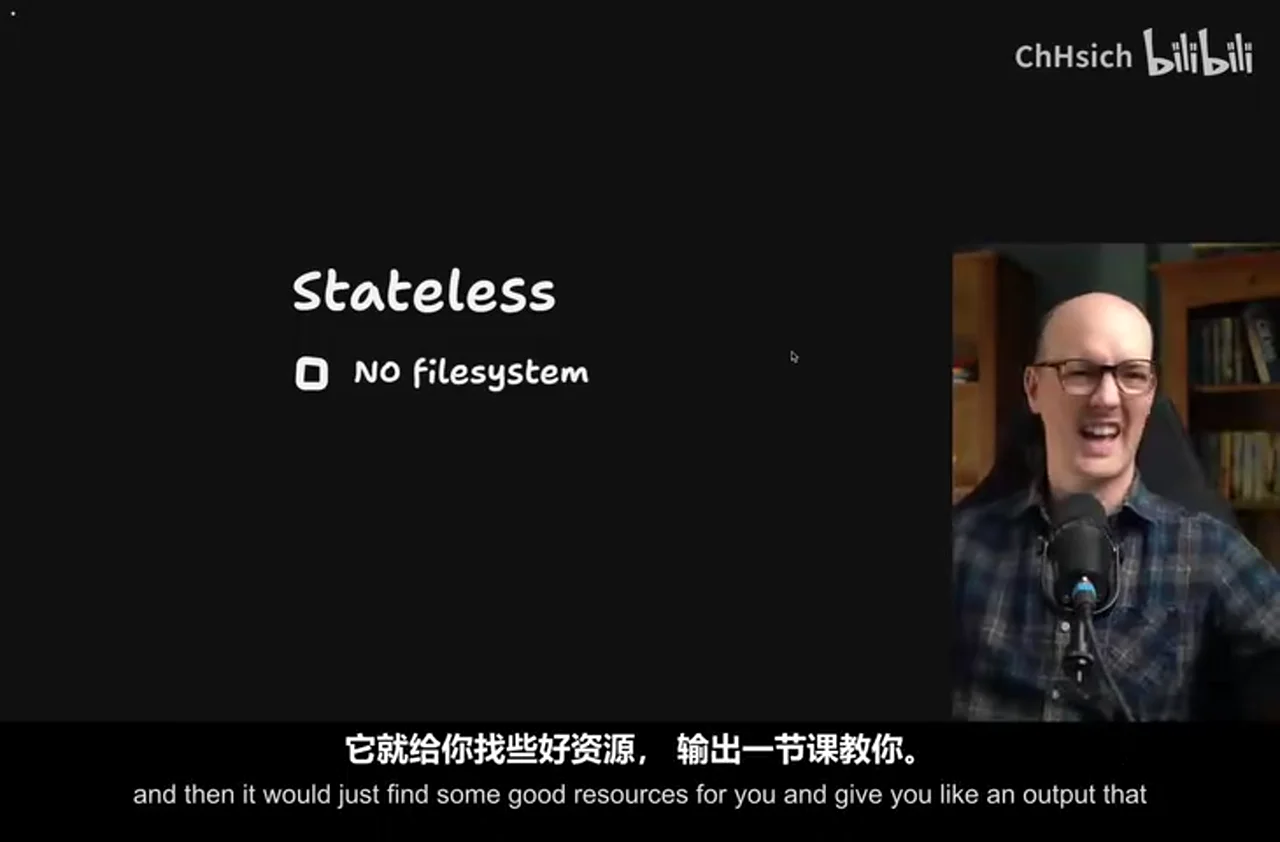
视频用 stateless / stateful 区分两类 skill。无状态 skill 不依赖前次运行留下的文件,适合一次性问答或盘问;有状态 skill 则把跨会话信息持久化。teach 属于后者,因为有效教学需要记住学习使命、进度、误区、资源和个人偏好。公开仓库当前版本确认 teach 是多会话、有状态的请求,并使用 MISSION.md、RESOURCES.md、学习记录、课程和 NOTES.md 等工作区文件;但“所有 skill 都可严格二分为有状态/无状态”以及“MCP 是通用持久化目标”只是视频中的概括,不能由该仓库单独证明。Matt Pocock Skills:teach SKILL.md
教学闭环
视频内容: 首次运行时,skill 先澄清学习者为什么学以及什么算完成,再寻找高可信资料并创建首课。课程采用编号 HTML 文件,能组合图示、提示、测验和交互练习;学习者汇报结果后,Agent 把已掌握内容、未固化技能和纠正过的误解写入 learning records,并据此调整后续课程。仓库当前规范确认课程位于 lessons/ 下,以递增编号的独立 HTML 文件保存;学习记录用于计算学习者的“最近发展区”并选择后续课程。Lessons 规范 · Learning Record Format
视频把学习目标分为三层:从高可信资源获得 Knowledge,通过相关练习形成 Skills,再通过真实世界和社区互动积累 Wisdom。课程应位于学习者“有挑战但不被吓退”的区间:只提供眼下必要的知识和练习,而不是预先倾倒完整课程。魔方案例中,Agent 发现学习者理解了 corner cycle、但尚未形成肌肉记忆,于是把下一课收窄为该算法的记忆训练。
适用价值与边界
视频内容: 讲者认为该模式也可用于代码库入职:同一套文档不一定适配不同背景的新人,而有状态教学工作区可以依据其技术栈与领域知识差异安排路径。讲者同时强调,skill 的目的不是把学习者永久留在 Agent 内,而是在知识和技能成熟后,把需要实践智慧的问题引向社区。
AI 辅助推断: teach 的可迁移价值不在于 HTML 本身,而在于“使命—证据—练习—反馈—状态更新”这一闭环。文件持久化解决了跨会话连续性,却不自动保证资料正确、练习有效或学习者真的掌握;高风险领域仍需专业资料、可观察的实践结果和合格教师或社区校验。
外部核验补充: 截至 2026-08-11,仓库当前安装说明使用 npx skills@latest add mattpocock/skills 后选择需要的 skill;视频录制时展示的安装命令可能已经变化。Matt Pocock Skills:安装说明
与相关笔记的连接
Agent需要的不是更长的 context,而是可追溯的 state讨论的是长期 Agent 如何把信号、证据和反馈归约成可靠状态;本视频给出一个具体的教学应用:使命、资源、学习记录和偏好共同决定下一课。组合阅读可以看出,“记住历史”只是起点,真正有用的是把历史整理为能影响下一次决策的学习状态。
辅助理解
辅助理解:teach 是一个持续更新的学习状态机
视频内容: 一次会话只负责眼前一课;工作区文件负责跨会话保存使命、证据、进度和偏好。下图重组了视频演示的闭环:
flowchart TD
    A[定义学习使命与完成标准] --> B[收集高可信资料]
    B --> C[读取已有学习记录与偏好]
    C --> D[判断当前最近发展区]
    D --> E[生成短小、聚焦的 HTML 课程]
    E --> F[讲解 + 练习 + 测验]
    F --> G[学习者报告或展示结果]
    G --> H[更新学习记录、术语表与笔记]
    H --> I{使命已达成?}
    I -->|否| C
    I -->|是| J[独立实践并进入社区]
1. 状态不是聊天历史,而是教学工作区
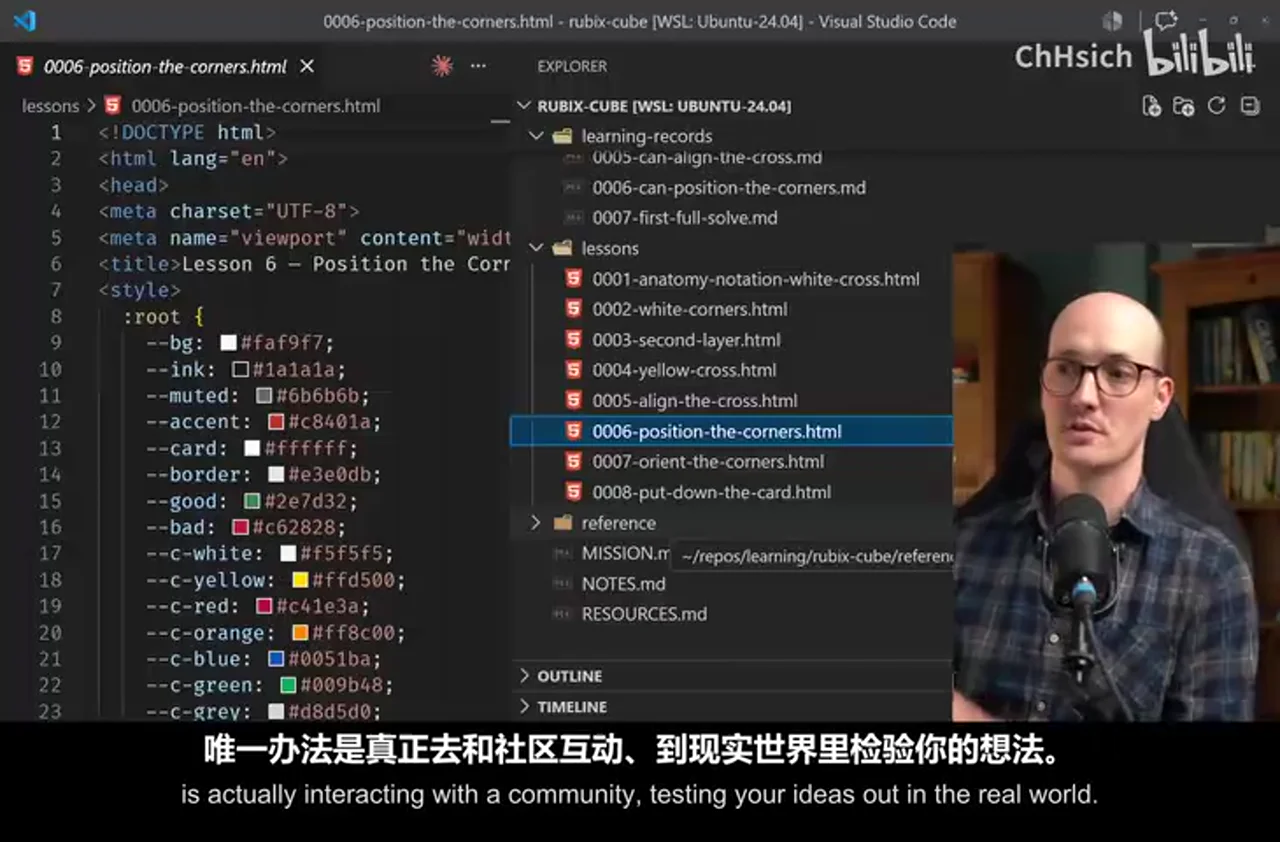
帧 3 同时显示 MISSION.md、RESOURCES.md、NOTES.md、learning-records/、lessons/ 与 reference/。它说明连续性来自一组职责不同的持久化文件,而不是依赖某个无限增长的对话窗口。
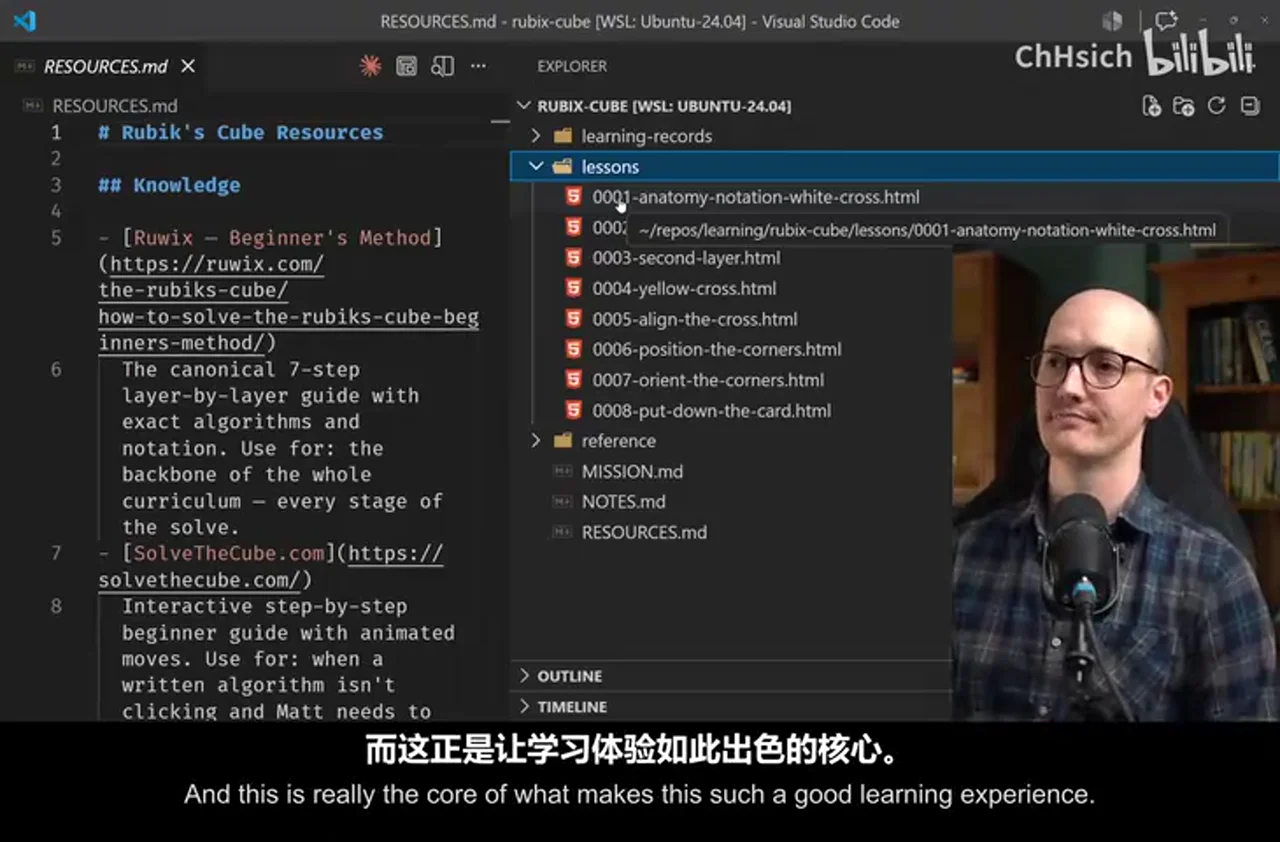
| 文件或目录 | 在视频中的作用 | 影响的后续决定 |
|---|---|---|
| Mission | 说明为什么学、什么算完成 | 防止课程偏离真实目标 |
| Resources | 保存高可信学习材料 | 约束知识来源与引用 |
| Learning records | 记录已掌握、误区与反馈 | 决定下一课难度和主题 |
| Lessons | 保存编号 HTML 课程 | 形成可回看、逐步推进的路径 |
| Reference / glossary | 汇总术语与速查材料 | 让后续课程更简洁 |
| Notes | 保存偏好与注意事项 | 调整呈现方式与教学策略 |
AI 辅助推断: 这里真正的“记忆”不是保存越多越好,而是把信息放入恰当的状态槽位。若只堆积对话全文,Agent 仍需要重新辨认哪些是目标、证据、能力表现或过期偏好。
2. HTML 把解释与可观察反馈放在一起
视频认为 HTML 比 Markdown 更适合富交互课程。帧 4 中,讲解、notation 小节和 “CHECK YOURSELF” 测验位于同一页面,说明课程不仅给信息,也试图让学习者立即作答或操作。
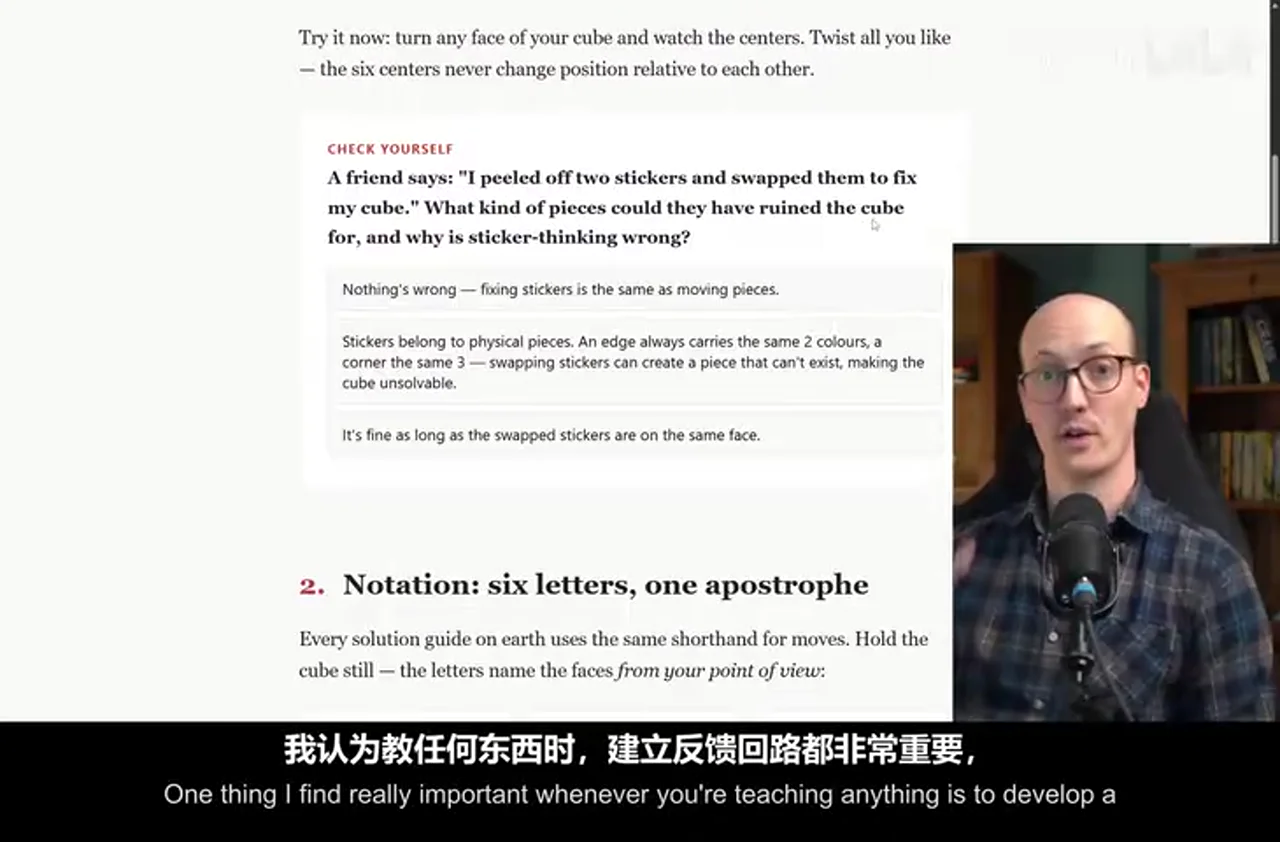
视频内容: 测验只是反馈环的一种基础形式;更好的反馈来自实际完成技能。魔方案例不是只问“看懂了吗”,而是让学习者报告能否完成白十字、是否能盲做算法等具体表现。
3. 新会话先诊断,再生成下一课
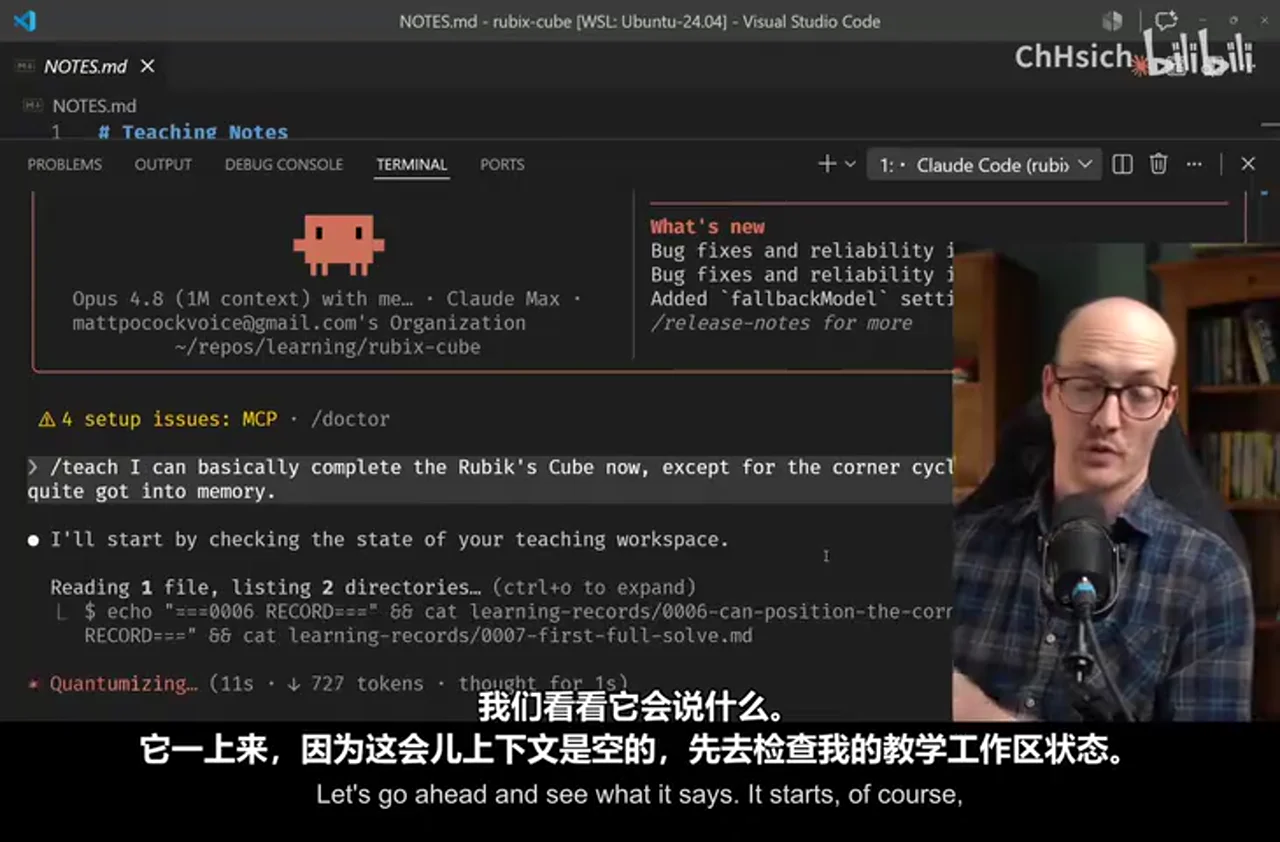
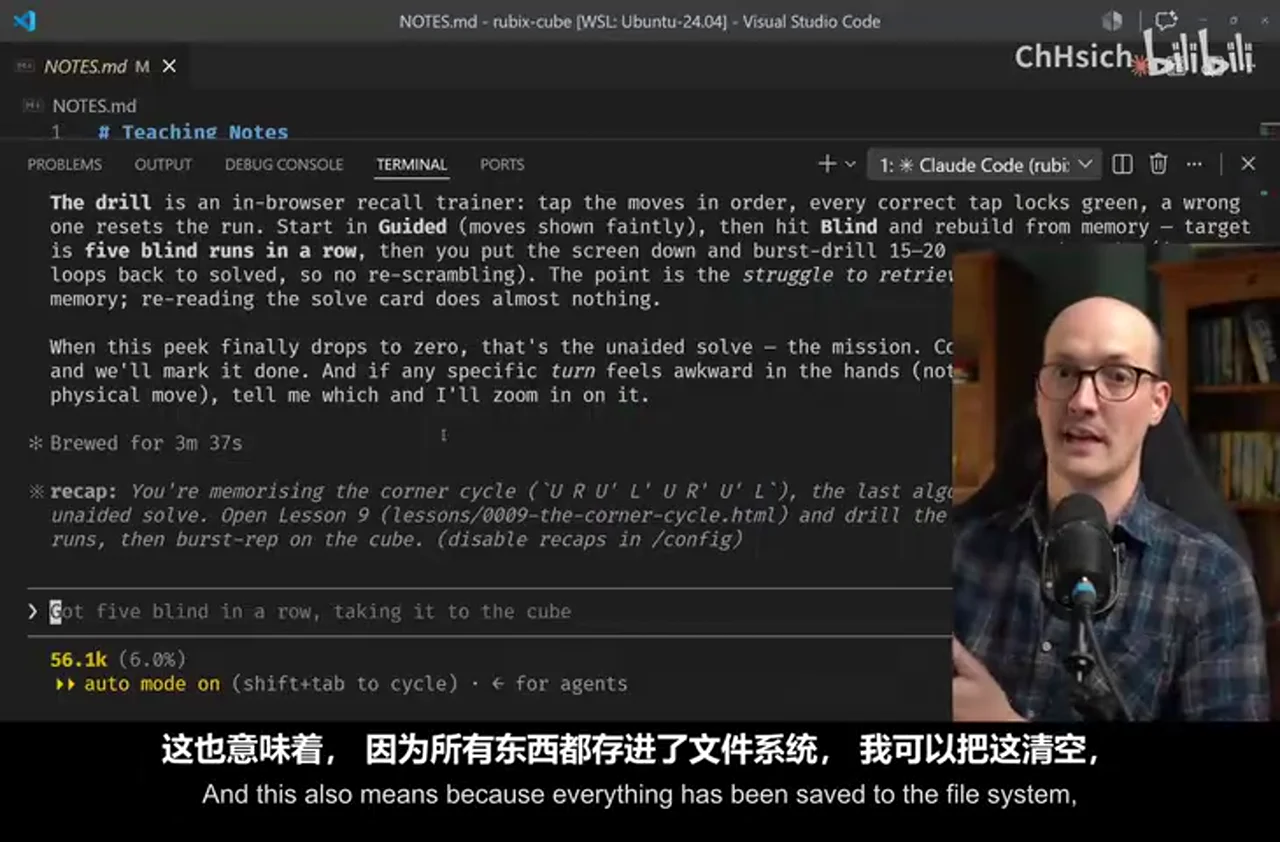
帧 6 展示学习者在新会话中运行 /teach,汇报“基本能复原,但 corner cycle 尚未记牢”;Agent 随即检查既有教学工作区。视频借此说明:清空上下文不会清空学习进度,因为必要状态已经外置。
flowchart LR
    R[学习者反馈] --> K{问题属于哪一层?}
    K -->|概念不懂| N[补知识与新解释]
    K -->|会说不会做| P[增加针对性练习]
    K -->|技能不稳定| M[缩小范围,强化记忆]
    K -->|需要情境判断| W[连接真实任务或社区]
    N --> U[记录新证据]
    P --> U
    M --> U
    W --> U
4. Knowledge、Skills、Wisdom 是不同交付物
帧 8 直接显示 SKILL.md 中的 Knowledge / Skills / Wisdom 哲学。视频要求知识来自高质量资源,技能通过相关课程和练习发展,而智慧最终需要与其他学习者、实践者和真实环境互动。
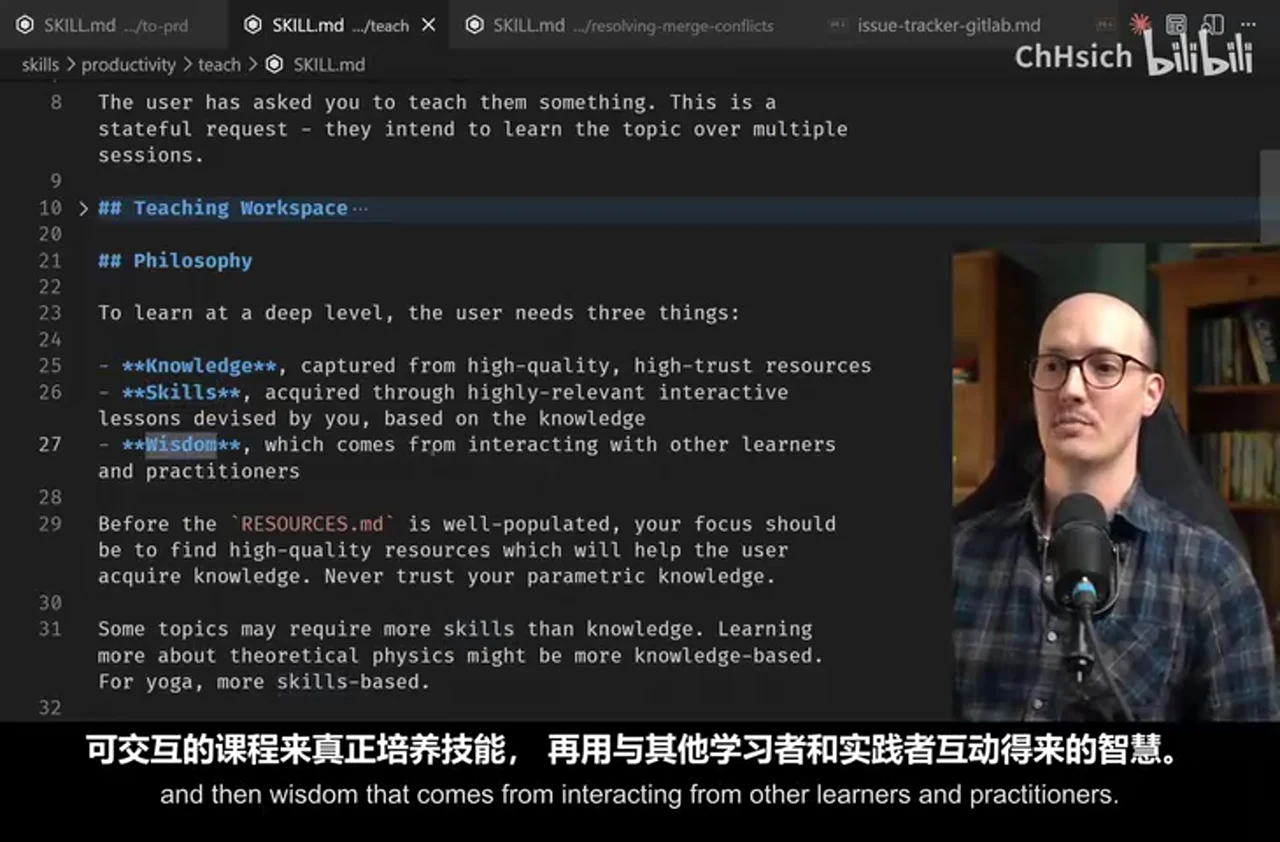
AI 辅助推断: 这一划分可用来检查 AI 教学是否“看起来丰富、实际上只在传递文字”:若没有可观察练习,就难以判断技能;若没有情境、后果与共同体反馈,也不应把模型回答包装成实践智慧。
5. 事实核验与使用边界
外部核验补充: 公开仓库确认 teach 当前把教学定义为有状态、多会话请求,并要求维护高质量资源、引用和学习记录。teach SKILL.md 这支持视频对该具体 skill 的描述,但不能证明任何主题都能因此获得与真人教师相同的质量。
使用时可以用三个问题做最低限度检查:
- 来源是否可追溯? 课程结论能否回到可靠资料,而非只依赖模型参数知识。
- 掌握是否可观察? 是否有作品、操作、测试或解释任务,而非只记录“我懂了”。
- 状态是否会纠错? 新证据能否更新旧记录,错误和过期偏好是否会被修正,而非永久累积。
Data
增强转写稿
[00:00] I realized the other day I’ve been teaching stuff for ten years. [00:03] I was a voice coach for six years and I’ve been doing this job teaching devs for four years. [00:07] And for a while I’ve been thinking wouldn’t it be great if I could take everything I know about teaching and put it inside a skill so that anyone could learn anything. [00:16] I had a long bus ride to London the other day and I wrote a teach skill and it turns out that it’s pretty good. [00:22] It taught me how to solve a Rubik’s Cube, which is something I’ve always wanted to learn how to do. [00:28] But I never really had the time or inclination to do it. [00:31] But with this teach skill it felt like I had a real teacher who was teaching how I liked to be taught and was totally aligned with my mission. [00:38] And I’m gonna show you how I did it. [00:39] The key concept when we’re looking at a teach skill is some skills can be stateful and some skills can be stateless. [00:46] If a skill is stateless it means that it doesn’t retain any state from previous runs. [00:51] It doesn’t have any memory of the things that you’ve done before. [00:53] In other words, a stateless skill doesn’t save anything on the file system to help it pick up where it left off later. [00:59] Whereas stateful skills do do that. [01:01] They save things either to the local file system or they save things to MCP servers. [01:06] They keep notes that they later track. [01:08] Initially I was thinking about teach as a kind of stateless skill where you would just say teach me this thing [01:14] and then it would just find some good resources for you and give you like an output that would teach you a lesson about that thing. [01:21] But I realized that all the good teaching that I do is stateful. [01:24] Where I teach you,I being the teacher,I remember where you’ve got to. [01:28] I know what you’ve learned.I know what you can go to next. [01:32] And I’ve got a bunch of great resources that I remember from previous times that I’ve taught this thing to teach you about it. [01:38] So I decided that teach had to be a stateful skill. [01:41] As an example,if you’ve used my skills repo before,you know that grill me is totally stateless. [01:46] It just grills you about a topic until you’re ready to implement. [01:50] But then grill with docs is actually stateful. [01:53] In other words,it saves some local ADRs,architectural decision records. [01:58] It saves some other stuff, some glossaries to the repo as well. [02:02] And so grill with docs is stateful and it gets better over time. [02:05] Whereas grill me is totally stateless. [02:08] Now one of these is not better than the other. [02:10] They’re just useful in different situations. [02:12] And so when you’re designing skills,you need to be careful to think about whether they need to be stateless or stateful. [02:18] And teach needed to be stateful. [02:20] The way you install this skill is you go to my skills repo, you go down to this quick start here [02:26] and you just run the skills.sh installer and you choose the teach skill. [02:30] Once you do that,you go to an empty directory and you run teach inside your coding agent. [02:35] So for instance,in this directory,which is my Rubik’s cube directory,I said teach me how to solve a Rubik’s cube. [02:41] And you’ll notice during my journey how many files it has created here. [02:45] But the first one it created was the mission. [02:47] I believe that for a teacher to be effective,you need to understand why a student wants to learn the thing. [02:53] And so I got this skill to create a mission for you. [02:57] Here it says map wants to be able to take a scramble 3x3 Rubik’s cube and solve it unaided at least once. [03:02] The goal is the achievement itself, not speed, not theory. [03:05] The next thing it does is it creates a set of resources. [03:08] So it goes and searches the web for actual primary source,high trust resources that it’s going to use to create the lessons out of. [03:16] It does this on the first pass when you ask it to teach you something,and then it will continue to update these as you go. [03:22] And then it will create your first lesson for you,and lessons are stored in the lessons folder,and they’re numbered like this,and they’re all individual HTML files. [03:30] HTML is just so much richer than Markdown,it allows it to be so much more expressive,so much more interactive,and this is really the core of what makes this such a good learning experience. [03:40] And here is my first lesson,anatomy notation and the white cross. [03:44] And it basically teaches you just what you need to know at that moment. [03:49] It gives you diagrams,it gives you very simple explainers,it gives you call-outs,and it gives you quizzes too. [03:55] One thing I find really important whenever you’re teaching anything is to develop a feedback loop,and quizzes are okay at this. [04:02] They’re basically good if you can’t find any richer feedback loop. [04:05] Again,if we zoom down this,we’ve got notations,we’ve got traps,we’ve got your first skill here. [04:11] And so it’s giving me the knowledge that I need,but also encouraging me to develop the skills I need,which is slightly different,and the skill itself knows that. [04:20] Once I completed the lesson and I said yes,I can make the white cross,then it recommended that,or rather recorded that,inside a learning record here. [04:29] And these learning records are very simple records that the agent creates when I report how I’m doing. [04:36] So this allows it to keep track of how I’m doing,just like a real teacher,then tailor the next lesson to what I need. [04:42] Here’s another explainer from slightly further down this course.I suppose it’s kind of creating a course as we go based on what I need. [04:50] So this one here,it was,okay,it started to add like little citations now. [04:55] Again,more quizzes.I mean,I just find this layout really nice to look at and really useful. [05:00] I was sort of working on the skill as I was building this too, and so I added this little button, or thing at the bottom. [05:06] It says,it tries to find communities where you can ask questions here. [05:11] Because sure,you can develop knowledge and skills here,but the only way you’re going to be develop wisdom about the thing is actually interacting with a community,testing your ideas out in the real world. [05:22] It also develops reference material for you too.This was something I noticed that I needed. [05:26] So there’s a glossary.This glossary has the anatomy,it has the notation here,it has the solving grip,the daisy,sort of anything like weird jargon that we’ve learned is going to go into the glossary. [05:38] This is really useful,especially if you’re learning like a coding language using this. [05:41] It also means that future lessons can be more concise,because they’re able to reference the term in the glossary,and you can look back if you’re confused. [05:49] It also creates cheat sheets for you.So this is a solve card here,where it’s basically just giving me the entire solve. [05:55] If I want just a single place to look at how to create or solve a Rubik’s Cube,this is the place I can go. [06:01] And finally,just to explain this notes.md file,this is where the agent can note down any of my preferences,note down any watch outs,and it’s just kind of internal note taking for the agent itself. [06:12] So let’s imagine that I sit down to a session,and I basically want to fill in the teacher on what I’ve been doing since I last had a session. [06:19] So I just say “Teach”,and I can basically complete the Rubik’s Cube now,except for the corner cycle,which I’ve still not quite got into memory. [06:29] Let’s go ahead and see what it says.It starts,of course,because this is an empty context by checking the state of my teaching workspace. [06:36] It’s checking all of the solve cards,seeing how far I’ve got to.It’s now giving me a decent diagnosis for what I’m feeling. [06:43] It’s saying the concept is solid for the corner cycle,which is a particular algorithm,but it’s the one that hasn’t reached muscle memory. [06:50] Let me look at the existing memorization lesson,one earlier lesson to match the house style. [06:54] So we have turned the agent basically into a teacher, and you have got to work with it in the same way that you would any one-to-one teacher. [07:01] You tell it what problems you’re having,and it will design lessons to find solutions. [07:06] Using here is Opus 4.8 with medium effort, by the way. It is also using a key teaching term here: the zone of proximal development; one algorithm, pure muscle-memory work. [07:16] The zone of proximal development is this key teaching idea,which I am obsessed with,and it’s the idea that you should always teach someone in the area where they are perfectly challenged,but not intimidated. [07:27] This means that every lesson has to be concise,compact,and exactly framed at that zone of proximal development,so the students not bored,but also not freaked out. [07:36] So we can see it’s now created this lesson,the corner cycle lesson.And it’s created this exact lesson for us.So it’s basically just breaking it down,paying more attention to it. [07:46] Giving me new mental models.One,four,move,phrase played twice.Okay,that is handy.And the idea is I would walk through this lesson.Oh,look at this.Oh my gosh,look at this. [07:56] So it has actually given me an interactive tap thing. I can do it. Okay, so it is U, R, U’, L’, U, R’, U’, L. Oh my God, look at this. So it has got guided mode, so I can turn off that. Oh, that’s unreasonably cool. [08:13] You see what being in HTML gives us here,right?We’ve got the full power of the browser to mess about with here.So you get the idea of what these lessons look like.They are short,they are really focused,and it gives me exactly what to practice now. [08:25] And this also means because everything has been saved to the file system,I can clear this,and every time I run teach again,it will have all the context it needs to keep me in the zone of proximal development. [08:36] Let’s briefly look at the skill itself here.It’s really quite simple,although it is one of the longer skills that I’ve put together.The user has asked you to teach them something.This is a stateful request. [08:46] They intend to learn the topic over multiple sessions.It goes into the shape of the teaching workspace,which we’ve looked at already,and it has a sectional philosophy here.So I really define the terms that the AI should think in. [08:58] It should think in terms of giving them knowledge from high quality,high trust resources,skills,highly relevant interactive lessons,and actually developing the skills,and then wisdom that comes from interacting from other learners and practitioners. [09:11] We go further down here,and we touch on the shape of the lessons themselves.We’ve talked about the mission as well,mission.md,the zone of proximal development,acquiring knowledge and skills,how to do that,acquiring wisdom,which basically when the learner is ready to go out into the world once they’ve got the knowledge and skills,how do you delegate them to the community. [09:30] When the user asks a question that appears to require wisdom,your default posture should be to attempt to answer,but to ultimately delegate to a community. [09:37] My idea with this teach skill is not to have you hooked onto the agent for learning everything,it’s to actually give you the skills you need to feel confident to go out and work with a community and send you out into the world.That’s the dream of this stuff. [09:51] We’ve also got more material here on reference documents than finally on notes.md,but that really is the skill.There’s a few little bits of supporting documents for like learning record format,the mission format,the resources format,etc. [10:03] In terms of engineering,I can imagine this skill being really useful in onboarding people to a codebase. [10:09] Grading documentation is a real pain in the ass,because not only do you need to keep it up to date,but that documentation is probably outside the person’s zone of proximal development. [10:18] They might have worked with your stack before,they might just need to know the specific problem domain,or they might have worked with the problem domain before,but they have no idea what type script is or things like that. [10:30] So you can think of teach here as,you know,you start them off in their own workspace,you point them at the codebase,you teach them how to,you know,they learn independently how to work with the code,what the concepts are,and guess what,you’ve got a productive employee in record time. [10:43] For me,I’m excited to use this just on my side projects,on having fun,on just learning stuff that I wouldn’t have learned how to do before,you know,solving this frigging Rubik’s Cube. [10:52] I might even dig out a bit of old chess material and see if it can teach me some openings. [10:56] And I wanted to end here by talking about an idea that I’ve had for a while,but I think this teach skill really proves or rather makes very plain to me,which is that we,the developer community,engineers out there,are the first people to really experience what AI can do on something that it’s really good at. [11:16] AI is currently better at writing code than it is at almost anything else. [11:20] There are a few exceptions,but really AI is very good at writing code,and developers have an advantage that we’re the first people to really get to test AI out on a problem where it’s very good at it. [11:32] This means that we are the first people really in the world,you know,with a couple of exceptions,that get to know AI,that get to build these cool things,and it means that we’re the first movers in this new space.We can take the ideas that we develop here,turn them into skills,and start bringing them out to the world. [11:51] I think that’s incredibly exciting,and it’s something that I’m going to be exploring more,and this teach skill is kind of the first phase of that. [11:58] So when you are working with Claude Code or Codex, and you are struggling with it, and you are losing motivation, you think, God, this sucks—just think that you will be able to take the skills that you are learning now, the instincts that you are building working with AI, and take them outside of coding domains. [12:13] That I think is going to be an incredibly valuable skill,no matter what the future of work looks like.We’re all going to be working with AI,and we are the first people to really get to do it. [12:24] Now, if you are digging my skills, then you should go to AI Hero Skills and sign up for my newsletter; that lets you know whenever I release a new skill, whenever I have any changes, because I do change the skills all the time. [12:36] If you want up-to-date information on how to use my skills for engineering,and for other stuff too,then check it out. [12:42] But overall,thanks for watching.I can’t wait to see the languages that you’re learning,coding languages,or human languages,the new skills that you’re developing. [12:49] I’m going to get this thing to teach me vocal harmonies,as well as always,a skill that I’ve wanted to know,but never been very good at,and I just can’t wait to get using this thing myself,and seeing how you’re using it too. [13:00] But overall,thanks so much for watching,and I’ll see you very soon.
原始转写稿
[00:00] I realized the other day I’ve been teaching stuff for ten years. [00:03] I was a voice coach for six years and I’ve been doing this job teaching devs for four years. [00:07] And for a while I’ve been thinking wouldn’t it be great if I could take everything I know about teaching and put it inside a skill so that anyone could learn anything. [00:16] I had a long bus ride to London the other day and I wrote a teach skill and it turns out that it’s pretty good. [00:22] It taught me how to solve a Rubik’s Cube, which is something I’ve always wanted to learn how to do. [00:28] But I never really had the time or inclination to do it. [00:31] But with this teach skill it felt like I had a real teacher who was teaching how I liked to be taught and was totally aligned with my mission. [00:38] And I’m gonna show you how I did it. [00:39] The key concept when we’re looking at a teach skill is some skills can be stateful and some skills can be stateless. [00:46] If a skill is stateless it means that it doesn’t retain any state from previous runs. [00:51] It doesn’t have any memory of the things that you’ve done before. [00:53] In other words, a stateless skill doesn’t save anything on the file system to help it pick up where it left off later. [00:59] Whereas stateful skills do do that. [01:01] They save things either to the local file system or they save things to MCP servers. [01:06] They keep notes that they later track. [01:08] Initially I was thinking about teach as a kind of stateless skill where you would just say teach me this thing [01:14] and then it would just find some good resources for you and give you like an output that would teach you a lesson about that thing. [01:21] But I realized that all the good teaching that I do is stateful. [01:24] Where I teach you,I being the teacher,I remember where you’ve got to. [01:28] I know what you’ve learned.I know what you can go to next. [01:32] And I’ve got a bunch of great resources that I remember from previous times that I’ve taught this thing to teach you about it. [01:38] So I decided that teach had to be a stateful skill. [01:41] As an example,if you’ve used my skills repo before,you know that grill me is totally stateless. [01:46] It just grills you about a topic until you’re ready to implement. [01:50] But then grill with docs is actually stateful. [01:53] In other words,it saves some local ADRs,architectural decision records. [01:58] It saves some other staff,some glossaries to the repo as well. [02:02] And so grill with docs is stateful and it gets better over time. [02:05] Whereas grill me is totally stateless. [02:08] Now one of these is not better than the other. [02:10] They’re just useful in different situations. [02:12] And so when you’re designing skills,you need to be careful to think about whether they need to be stateless or stateful. [02:18] And teach needed to be stateful. [02:20] The way you install this skill is you go to my skills repo map,you go down to this quick start here [02:26] and you just run the skills.sh installer and you choose the teach skill. [02:30] Once you do that,you go to an empty directory and you run teach inside your coding agent. [02:35] So for instance,in this directory,which is my Rubik’s cube directory,I said teach me how to solve a Rubik’s cube. [02:41] And you’ll notice during my journey how many files it has created here. [02:45] But the first one it created was the mission. [02:47] I believe that for a teacher to be effective,you need to understand why a student wants to learn the thing. [02:53] And so I got this skill to create a mission for you. [02:57] Here it says map wants to be able to take a scramble 3x3 Rubik’s cube and solve it unaided at least once. [03:02] The goal is the achievement itself,not speed,not theory. [03:05] The next thing it does is it creates a set of resources. [03:08] So it goes and searches the web for actual primary source,high trust resources that it’s going to use to create the lessons out of. [03:16] It does this on the first pass when you ask it to teach you something,and then it will continue to update these as you go. [03:22] And then it will create your first lesson for you,and lessons are stored in the lessons folder,and they’re numbered like this,and they’re all individual HTML files. [03:30] HTML is just so much richer than Markdown,it allows it to be so much more expressive,so much more interactive,and this is really the core of what makes this such a good learning experience. [03:40] And here is my first lesson,anatomy notation and the white cross. [03:44] And it basically teaches you just what you need to know at that moment. [03:49] It gives you diagrams,it gives you very simple explainers,it gives you call-outs,and it gives you quizzes too. [03:55] One thing I find really important whenever you’re teaching anything is to develop a feedback loop,and quizzes are okay at this. [04:02] They’re basically good if you can’t find any richer feedback loop. [04:05] Again,if we zoom down this,we’ve got notations,we’ve got traps,we’ve got your first skill here. [04:11] And so it’s giving me the knowledge that I need,but also encouraging me to develop the skills I need,which is slightly different,and the skill itself knows that. [04:20] Once I completed the lesson and I said yes,I can make the white cross,then it recommended that,or rather recorded that,inside a learning record here. [04:29] And these learning records are very simple records that the agent creates when I report how I’m doing. [04:36] So this allows it to keep track of how I’m doing,just like a real teacher,then tailor the next lesson to what I need. [04:42] Here’s another explainer from slightly further down this course.I suppose it’s kind of creating a course as we go based on what I need. [04:50] So this one here,it was,okay,it started to add like little citations now. [04:55] Again,more quizzes.I mean,I just find this layout really nice to look at and really useful. [05:00] I was sort of working on the skill as I was building this too,and so I added this little bottom,or thing at the bottom. [05:06] It says,it tries to find communities where you can ask questions here. [05:11] Because sure,you can develop knowledge and skills here,but the only way you’re going to be develop wisdom about the thing is actually interacting with a community,testing your ideas out in the real world. [05:22] It also develops reference material for you too.This was something I noticed that I needed. [05:26] So there’s a glossary.This glossary has the anatomy,it has the notation here,it has the solving grip,the daisy,sort of anything like weird jargon that we’ve learned is going to go into the glossary. [05:38] This is really useful,especially if you’re learning like a coding language using this. [05:41] It also means that future lessons can be more concise,because they’re able to reference the term in the glossary,and you can look back if you’re confused. [05:49] It also creates cheat sheets for you.So this is a solve card here,where it’s basically just giving me the entire solve. [05:55] If I want just a single place to look at how to create or solve a Rubik’s Cube,this is the place I can go. [06:01] And finally,just to explain this notes.md file,this is where the agent can note down any of my preferences,note down any watch outs,and it’s just kind of internal note taking for the agent itself. [06:12] So let’s imagine that I sit down to a session,and I basically want to fill in the teacher on what I’ve been doing since I last had a session. [06:19] So I just say “Teach”,and I can basically complete the Rubik’s Cube now,except for the corner cycle,which I’ve still not quite got into memory. [06:29] Let’s go ahead and see what it says.It starts,of course,because this is an empty context by checking the state of my teaching workspace. [06:36] It’s checking all of the solve cards,seeing how far I’ve got to.It’s now giving me a decent diagnosis for what I’m feeling. [06:43] It’s saying the concept is solid for the corner cycle,which is a particular algorithm,but it’s the one that hasn’t reached muscle memory. [06:50] Let me look at the existing memorization lesson,one earlier lesson to match the house style. [06:54] So we’ve turned the agent basically into a teacher,and you’ve got to work with it in the same way that you would any one-to-one teacher. [07:01] You tell it what problems you’re having,and it will design lessons to find solutions. [07:06] Using here is opus 4.8 with medium effort,by the way.It’s also using a key teaching term here,the zone of proximal development,one algorithm,pure muscle memory work. [07:16] The zone of proximal development is this key teaching idea,which I am obsessed with,and it’s the idea that you should always teach someone in the area where they are perfectly challenged,but not intimidated. [07:27] This means that every lesson has to be concise,compact,and exactly framed at that zone of proximal development,so the students not bored,but also not freaked out. [07:36] So we can see it’s now created this lesson,the corner cycle lesson.And it’s created this exact lesson for us.So it’s basically just breaking it down,paying more attention to it. [07:46] Giving me new mental models.One,four,move,phrase played twice.Okay,that is handy.And the idea is I would walk through this lesson.Oh,look at this.Oh my gosh,look at this. [07:56] So it’s actually given me an interactive tap thing,I can do it.Okay,so it’s U,R,U’,L’,U,R’,U’,L.Oh my god,look at this.So it’s got guided mode,so I can turn off that.Oh,that’s unreasonably cool. [08:13] You see what being in HTML gives us here,right?We’ve got the full power of the browser to mess about with here.So you get the idea of what these lessons look like.They are short,they are really focused,and it gives me exactly what to practice now. [08:25] And this also means because everything has been saved to the file system,I can clear this,and every time I run teach again,it will have all the context it needs to keep me in the zone of proximal development. [08:36] Let’s briefly look at the skill itself here.It’s really quite simple,although it is one of the longer skills that I’ve put together.The user has asked you to teach them something.This is a stateful request. [08:46] They intend to learn the topic over multiple sessions.It goes into the shape of the teaching workspace,which we’ve looked at already,and it has a sectional philosophy here.So I really define the terms that the AI should think in. [08:58] It should think in terms of giving them knowledge from high quality,high trust resources,skills,highly relevant interactive lessons,and actually developing the skills,and then wisdom that comes from interacting from other learners and practitioners. [09:11] We go further down here,and we touch on the shape of the lessons themselves.We’ve talked about the mission as well,mission.md,the zone of proximal development,acquiring knowledge and skills,how to do that,acquiring wisdom,which basically when the learner is ready to go out into the world once they’ve got the knowledge and skills,how do you delegate them to the community. [09:30] When the user asks a question that appears to require wisdom,your default posture should be to attempt to answer,but to ultimately delegate to a community. [09:37] My idea with this teach skill is not to have you hooked onto the agent for learning everything,it’s to actually give you the skills you need to feel confident to go out and work with a community and send you out into the world.That’s the dream of this stuff. [09:51] We’ve also got more material here on reference documents than finally on notes.md,but that really is the skill.There’s a few little bits of supporting documents for like learning record format,the mission format,the resources format,etc. [10:03] In terms of engineering,I can imagine this skill being really useful in onboarding people to a codebase. [10:09] Grading documentation is a real pain in the ass,because not only do you need to keep it up to date,but that documentation is probably outside the person’s zone of proximal development. [10:18] They might have worked with your stack before,they might just need to know the specific problem domain,or they might have worked with the problem domain before,but they have no idea what type script is or things like that. [10:30] So you can think of teach here as,you know,you start them off in their own workspace,you point them at the codebase,you teach them how to,you know,they learn independently how to work with the code,what the concepts are,and guess what,you’ve got a productive employee in record time. [10:43] For me,I’m excited to use this just on my side projects,on having fun,on just learning stuff that I wouldn’t have learned how to do before,you know,solving this frigging Rubik’s Cube. [10:52] I might even dig out a bit of old chess material and see if it can teach me some openings. [10:56] And I wanted to end here by talking about an idea that I’ve had for a while,but I think this teach skill really proves or rather makes very plain to me,which is that we,the developer community,engineers out there,are the first people to really experience what AI can do on something that it’s really good at. [11:16] AI is currently better at writing code than it is at almost anything else. [11:20] There are a few exceptions,but really AI is very good at writing code,and developers have an advantage that we’re the first people to really get to test AI out on a problem where it’s very good at it. [11:32] This means that we are the first people really in the world,you know,with a couple of exceptions,that get to know AI,that get to build these cool things,and it means that we’re the first movers in this new space.We can take the ideas that we develop here,turn them into skills,and start bringing them out to the world. [11:51] I think that’s incredibly exciting,and it’s something that I’m going to be exploring more,and this teach skill is kind of the first phase of that. [11:58] So when you’re working with claw code or codex,and you’re struggling with it,and you’re losing motivation,you think God,this sucks,just think that you’ll be able to take the skills that you are learning now,the instincts that you’re building,working with AI,and take them outside of coding domains. [12:13] That I think is going to be an incredibly valuable skill,no matter what the future of work looks like.We’re all going to be working with AI,and we are the first people to really get to do it. [12:24] Now,if you’re digging my skills,then you should go to AI hero/skills,and sign up for my newsletter,that lets you know whenever I release a new skill,whenever I have any changes,because I do change the skills all the time. [12:36] If you want up-to-date information on how to use my skills for engineering,and for other stuff too,then check it out. [12:42] But overall,thanks for watching.I can’t wait to see the languages that you’re learning,coding languages,or human languages,the new skills that you’re developing. [12:49] I’m going to get this thing to teach me vocal harmonies,as well as always,a skill that I’ve wanted to know,but never been very good at,and I just can’t wait to get using this thing myself,and seeing how you’re using it too. [13:00] But overall,thanks so much for watching,and I’ll see you very soon.
原始关键帧
关键帧 1
关键帧 2
关键帧 3
关键帧 4
关键帧 5
关键帧 6
关键帧 7
关键帧 8
关键帧 9
关键帧 10